Identity is what
attackers come for first.
Identity Security Posture Management (ISPM) is the continuous assessment of who can access what across your directories and clouds, and how those permissions chain into attack paths. Most breaches start with an identity that shouldn't have been there. Identity X-Ray maps the real attack paths to Tier 0, on-prem and in the cloud, then unifies your identity risk across cloud IAM, Entra ID, Active Directory and FortiGate. One graph, one score, one compliance view.
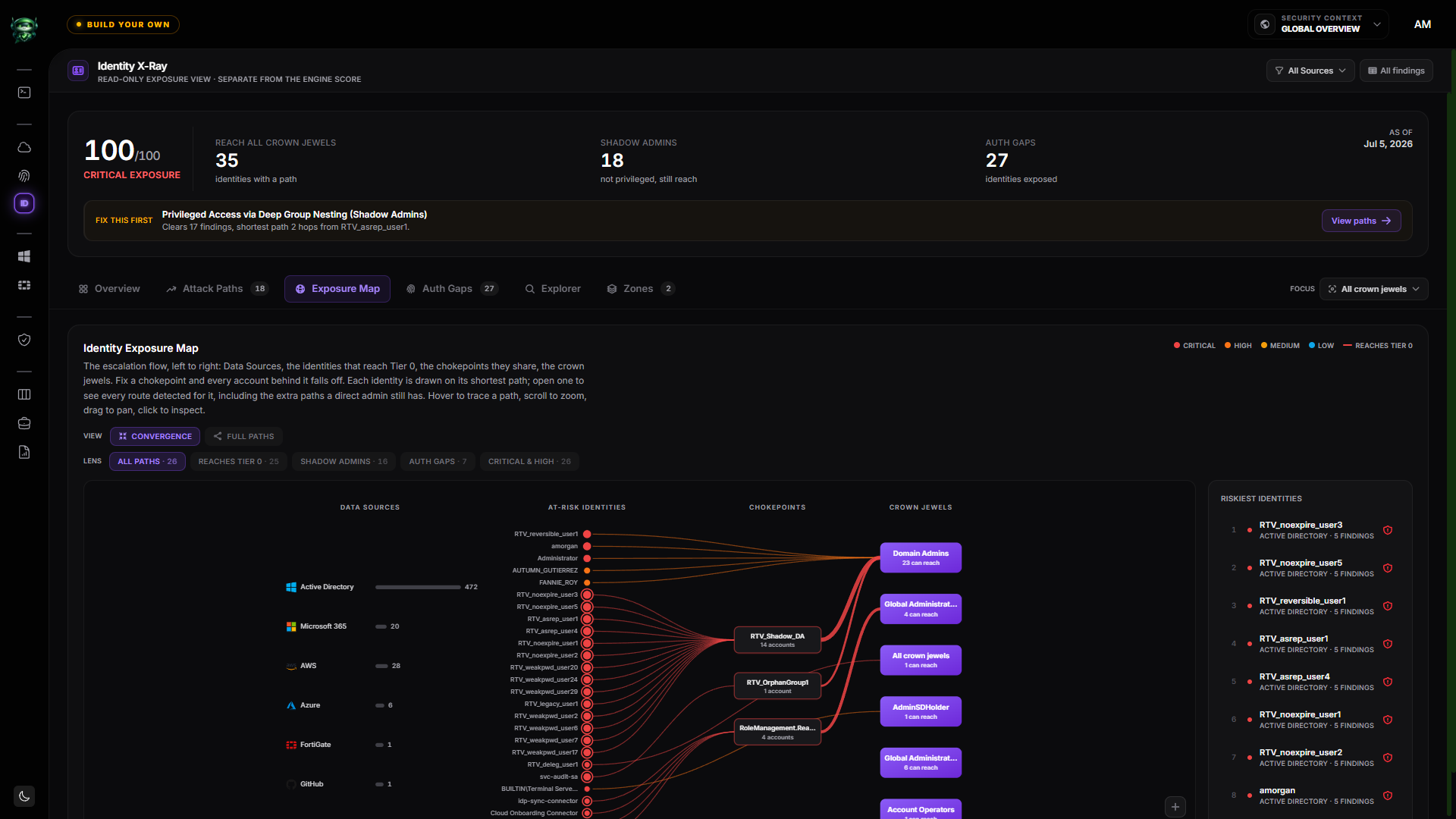
The Identity Exposure Map. Data Sources, the identities that reach Tier 0, the chokepoints they share, and the crown jewels, on one graph.
Your privilege surface lives in seven places.
AWS IAM. Entra ID. GCP IAM. OCI Identity Domains. Cloudflare Access. Active Directory. FortiGate admin profiles. Each one has its own console, its own audit log, its own concept of "who is privileged".
So the AWS team doesn't see the dormant Global Admin in Entra. The AD team doesn't see that an EC2 role has full administrator. Nobody sees the FortiGate admin still authenticating with a password while the rest of the org moved to MFA. And no single tool answers the question every CISO needs answered: "How exposed is our identity surface, right now, end to end?"
ISPM is that single tool. One score, one compliance view, every identity source in one place.
Every path to Tier Zero,
on one map.
A list of privileged users tells you who is an admin. It never tells you who can become one. Identity X-Ray builds the graph of who confers privilege on whom, across every Data Source, then draws every route that reaches your crown jewels: Data Sources, the at-risk identities, the chokepoints they share, and Tier 0.
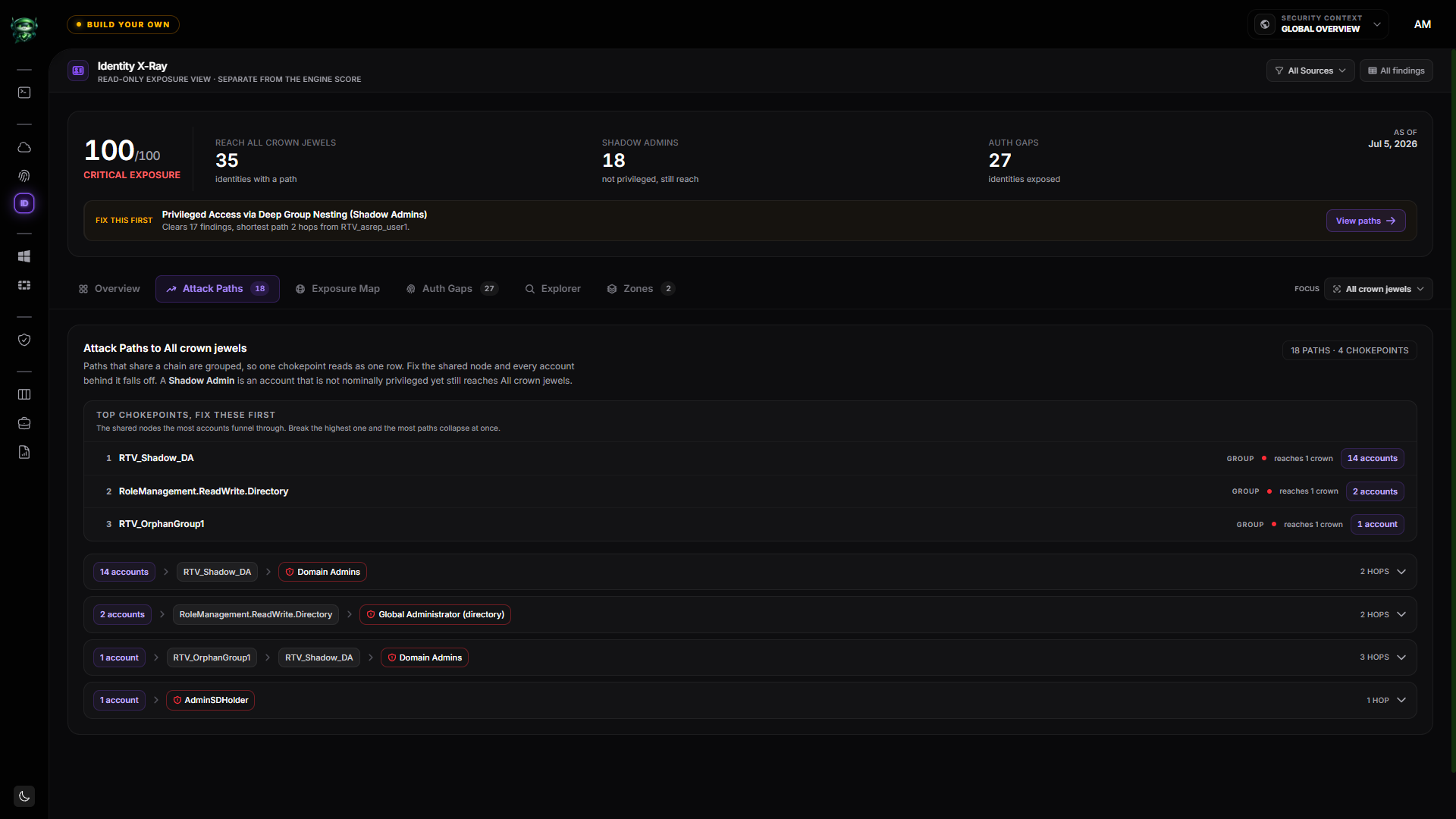
Attack paths, grouped by the chokepoint every account funnels through. Fix the shared node and the whole group falls off.
Not who is an admin. Who can reach one.
The graph walks group nesting, ACL and ACE rights, delegation, ownership and cloud entitlements up to ten hops. A helpdesk account three groups deep from Domain Admins shows up as clearly as a direct member.
One fix, many paths closed.
Retrievy ranks the shared nodes the most accounts pass through. Break the top chokepoint and dozens of routes collapse at once, so your team fixes the node that matters, not fifty findings one at a time.
The admins nobody put on the list.
A shadow admin is not nominally privileged, yet still reaches a crown jewel through a chain. The Privileged inventory labels each identity Shadow Admin or By-design, so earned access is easy to tell from accidental access.
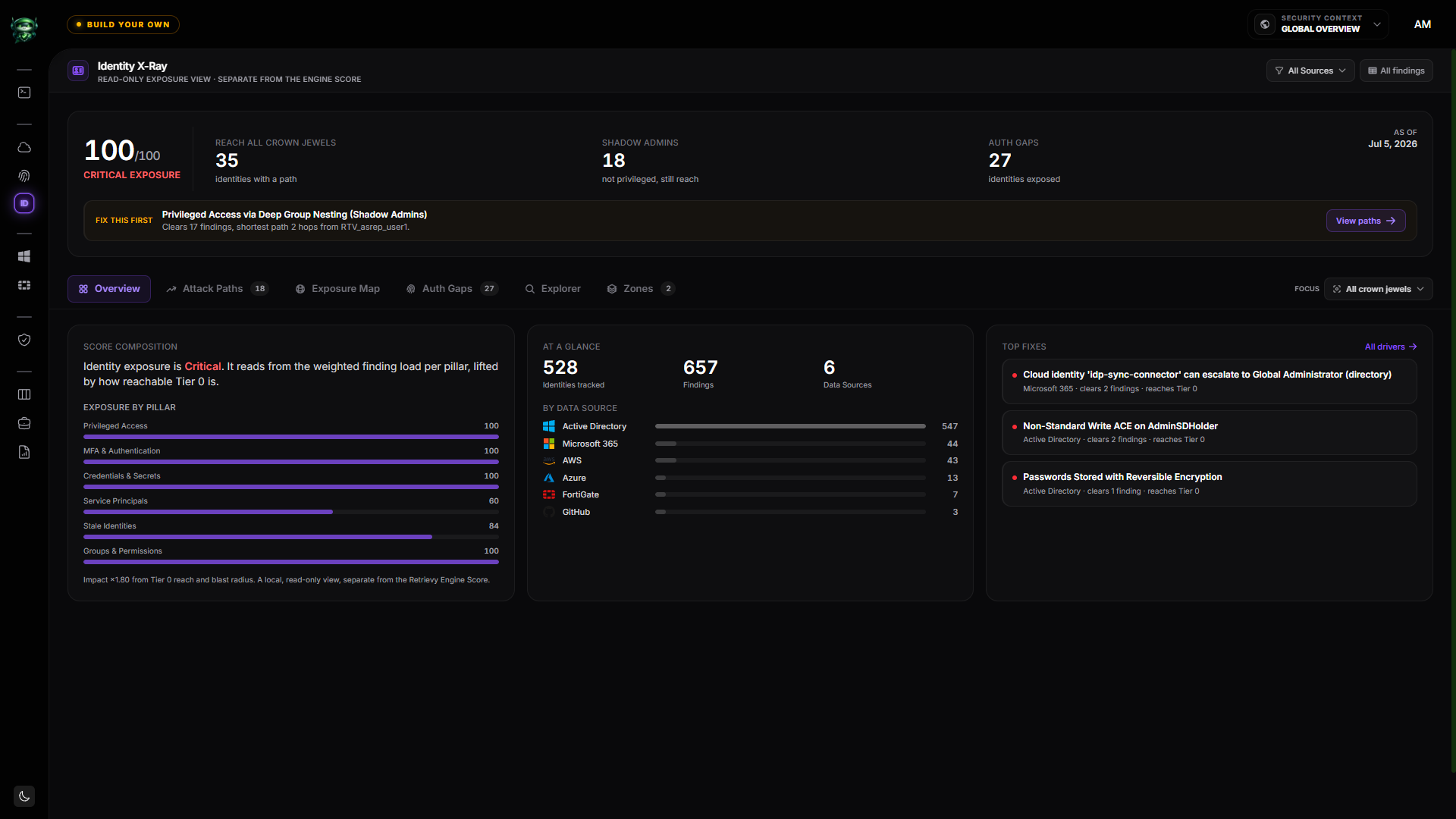
The whole surface, in three numbers.
Reach (how many identities have a path to Tier 0), Shadow Admins, and Auth Gaps, over a single exposure read-out. A "Fix this first" bar always names the highest-leverage move and the shortest path behind it.
The exposure view is read-only and deliberately separate from your Retrievy Engine Score, so exploring blast radius never moves the grade your auditors see.
Your cloud entitlements,
mapped like Active Directory.
On-prem teams have asked "who can become Domain Admin?" for years. The cloud rarely gets the same answer, because Entra roles, Azure RBAC, app permissions, group ownership and managed identities each live in a different blade. CIEM reads all of them, read-only, and draws the escalation edges into the same Identity X-Ray graph.
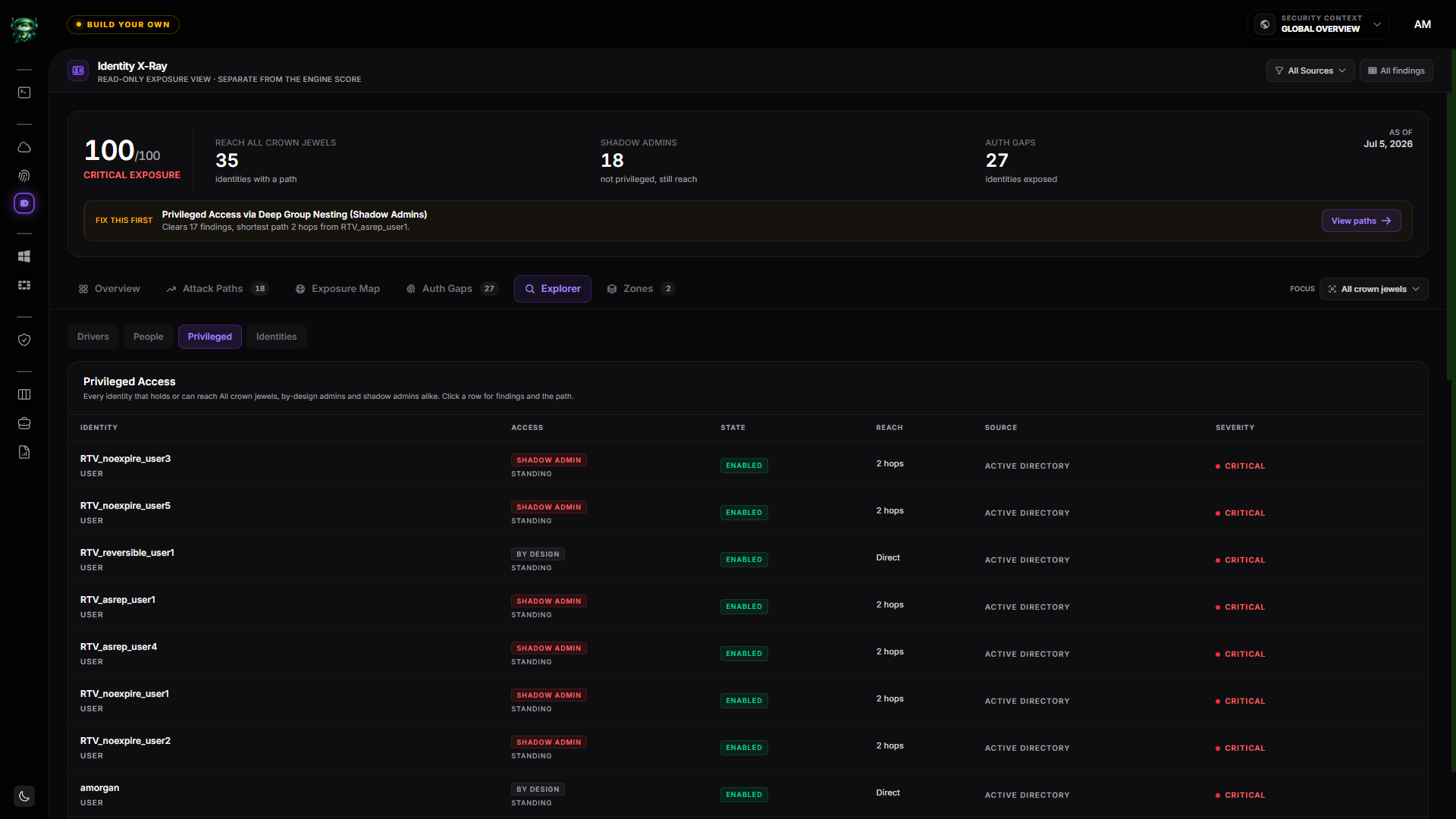
The privileged inventory. Standing versus PIM-eligible, Shadow Admin versus By-design, and how many hops each identity sits from the crown.
The escalation edges it draws.
Each edge is only drawn when the read-only snapshot proves the relationship. Every one also becomes a finding, so it scores and remediates like any other.
Group chain to Global Admin
A user or service principal is a member, nested arbitrarily deep, of a group that holds a crown role such as Global Administrator. The highest-volume path.
PIM-eligible, just-in-time
A dormant but eligible role assignment counts as reach. Drawn distinct, flagged as JIT, and ranked below standing access, because it is one self-service activation from admin.
Graph app-permission escalation
A service principal holding RoleManagement.ReadWrite.Directory or AppRoleAssignment.ReadWrite.All is one non-interactive hop from Global Administrator.
Cross-app takeover
Application.ReadWrite.All lets a principal mint a credential on any other app and authenticate as it, crossing from the directory plane into Azure resources.
Azure RBAC self-escalation
Owner, User Access Administrator or RBAC Administrator at a scope can grant Owner to itself. Ranked by blast radius, from a single subscription up to the root management group.
Ownership add-credential
An owner of a service principal, its app registration, or a role-bearing group adds a credential or itself, and inherits the privilege.
Managed-identity token theft
Code-execution rights on a resource that hosts a managed identity let a principal read the identity token from instance metadata and act as it, often Owner at a subscription.
SyncJacking
A member of the Directory Synchronization Accounts role is Tier-0 equivalent, with credentials recoverable from an off-domain, less-hardened sync server.
Consent & app hygiene
Illicit consent grants, over-consented tenant-wide apps, dynamic and role-assignable groups with owners, and app credentials that are expired, expiring or never-expiring.
Where authentication is weak,
and what counts as your crown.
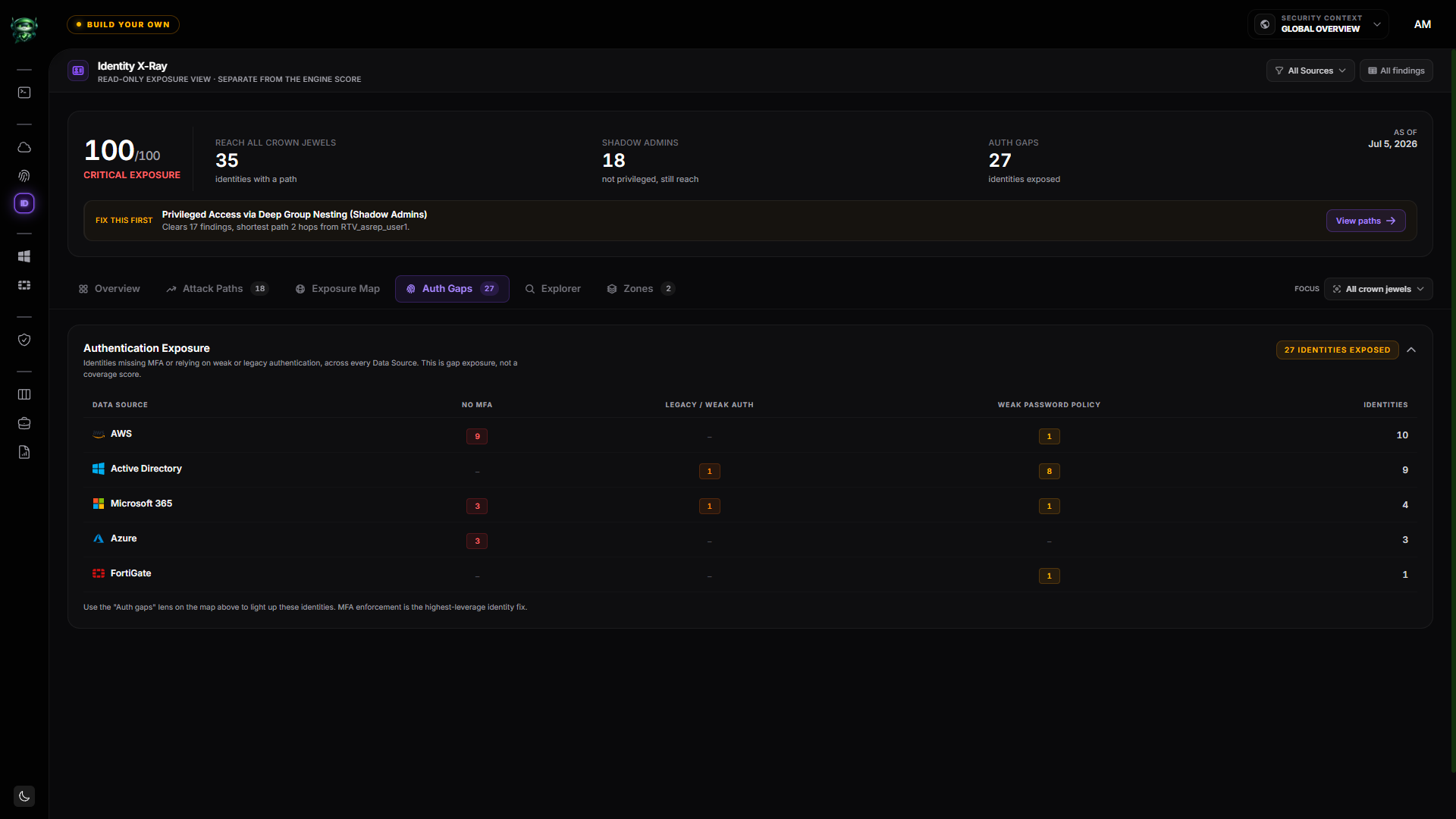
The MFA and legacy-auth map.
Distinct identities missing MFA, relying on legacy or weak authentication, or covered by a weak password policy, counted across AWS, Active Directory, Microsoft 365, Azure and FortiGate. Exposure, not a coverage percentage, so the real gap is never averaged away.
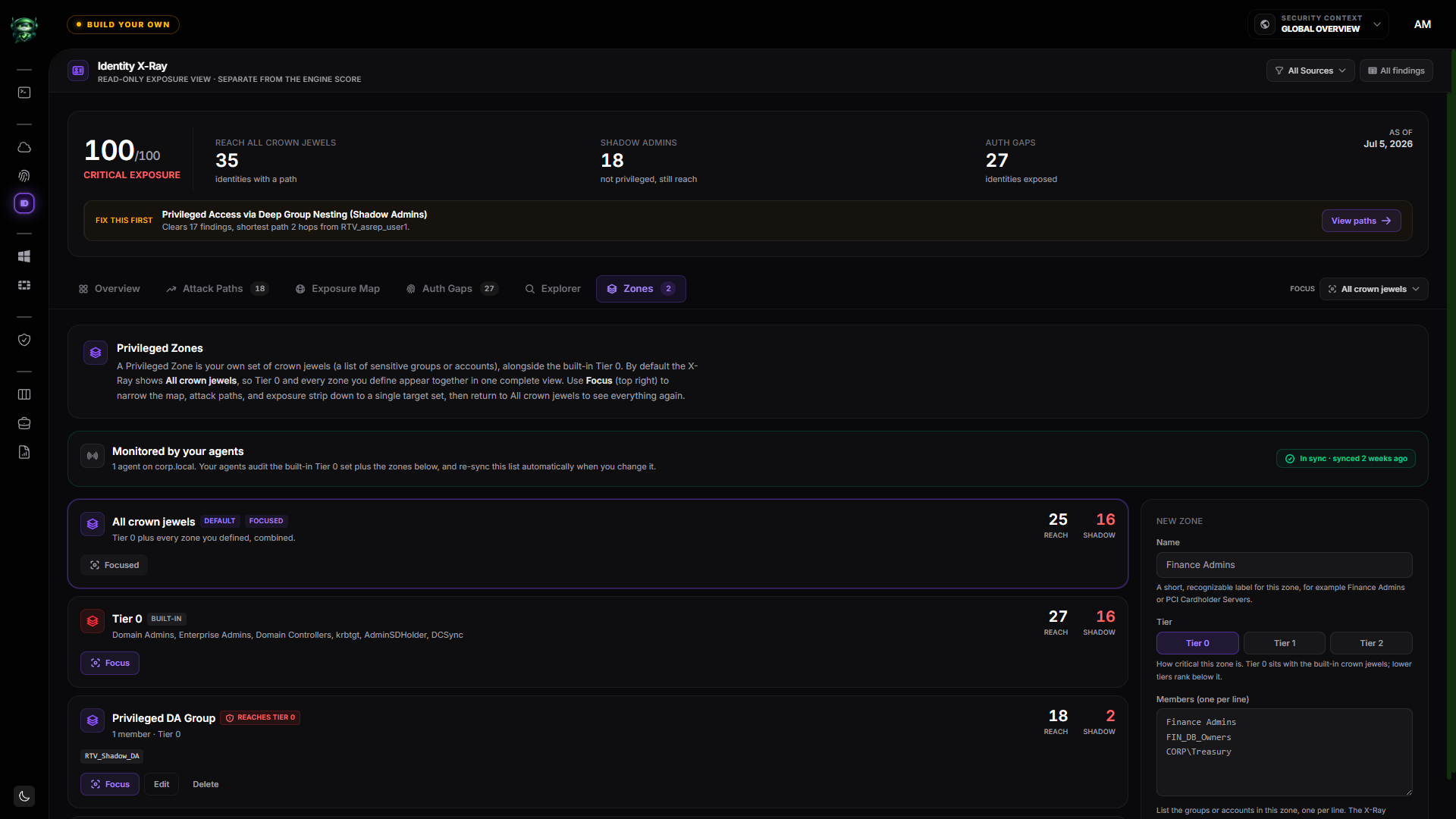
Your crown jewels, your definition.
Tier 0 ships built in (Domain Admins, Enterprise Admins, krbtgt, AdminSDHolder, DCSync). Add your own, for example Finance Admins or PCI cardholder servers, and the whole X-Ray recomputes reach and shadow-admin counts for that target. Your agents pick up the new crown list automatically.
A map you can take to the board.
An attack-path graph is only useful if you can trust every edge on it. These are contracts in the product, not marketing lines.
No fabricated edges
A path is drawn only when the collected snapshot proves the relationship. The walker terminates cleanly at the crown, and a partial or denied collection degrades to empty rather than guessing.
Read-only, and off to one side
Collection is read-only on every source. The exposure number is computed locally for display and is explicitly separate from the Retrievy Engine Score.
PIM eligible is not active
Just-in-time eligibility is drawn distinct, flagged, and ranked below standing access, so a dormant path is never dressed up as a live one.
Every path, not just the shortest
The deep-dive shows every route an identity has. A direct admin that also reaches admin through a chain shows both, because both are real.
Honest coverage states
Zones distinguish awaiting a scan, scanned and empty, and mapped. "Not collected" is a first-class state, never a silent assumption of zero.
Bounded and logged
Path enumeration is bounded against dense directories. Hitting the budget is logged, never silently truncated into a prettier answer.
Three onboarding paths.
One identity score.
Connect one source today, three over time. ISPM aggregates as soon as findings arrive, and the score updates as your coverage grows.
OAuth or IAM role. 5 minutes per provider.
Connect AWS, Azure / Entra, GCP, OCI, M365, and Cloudflare with read-only scopes. IAM and IDP findings auto-route to ISPM the moment they arrive.
Cloud onboarding detailsWindows agent on a Domain Controller. ~5 minutes.
Signed MSI installs directly on a Domain Controller. Runs as SYSTEM and uses the DC's Kerberos machine credentials for LDAP. No service account required.
AD agent detailsRead-only SSH. ~3 minutes per device.
A read-only admin profile is enough. Identity-plane checks (admin password policy, SNMPv3 auth, default-admin removal, trusted hosts, encrypted access) auto-route into ISPM.
FortiGate collector detailsThe checks
behind the graph.
100+ identity-plane checks across cloud IAM, Active Directory, and FortiGate admin profiles feed the same map and the same ISPM score, each one tied to a compliance framework.
Privilege sprawl across providers.
Over-privileged roles, unused access keys, root-account usage, missing IAM Access Analyzer findings. AWS, GCP, OCI, and Cloudflare auto-route to ISPM.
Privileged role & MFA posture.
Conditional Access misconfigurations, Global Admin sprawl, weak MFA enforcement, dormant guest invites, privileged role assignment without PIM.
Kerberos exposure & indirect Domain Admin.
Kerberoastable SPNs (RC4 vs AES). AS-REP roastable accounts. Up to 10 levels of group nesting walked, surfacing every user transitively in a privileged group, including the helpdesk member nested through three layers no one remembered.
LAPS coverage gap.
Schema attribute analysis (ms-Mcs-AdmPwd / ms-LAPS-Password) identifies the workstations missing local-admin password rotation. Exactly what a ransomware operator pivots on.
Admin & authentication hardening.
Admin password policy, default-admin removal, trusted hosts, SNMPv3 auth and privacy, encrypted access only, admin idle timeout. Network admin identities get the same scrutiny as your cloud and AD.
Dormant identities, anywhere they live.
30 / 90 / 180-day idle accounts across cloud IAM, Entra ID, AD, and FortiGate admin profiles. One transparent ISPM view of every account that's gone quiet, regardless of where it was created.
Copy-paste-ready
PowerShell, on every finding.
Identifies user accounts with a registered SPN that can be Kerberoasted. An attacker requests a service ticket, extracts the encrypted blob, and offline-cracks the account password. Most exposed when the password is weak and the encryption type allows RC4.
# Migrate to a Group-Managed Service Account (gMSA)
New-ADServiceAccount -Name svc_sql01_gmsa `
  -DNSHostName sql01.corp.local `
  -PrincipalsAllowedToRetrieveManagedPassword 'sql-cluster$' `
  -KerberosEncryptionType AES128, AES256

# Reassign the SPN
setspn -D MSSQLSvc/sql01.corp.local:1433 svc_sql01
setspn -A MSSQLSvc/sql01.corp.local:1433 svc_sql01_gmsa$- → Microsoft Learn · Group Managed Service Accounts
- → CIS Microsoft Windows Server · Kerberos Policy
- → MITRE ATT&CK T1558.003 · Kerberoasting
Findings flow Triage → Verifying → Hardened. The "Trust but Verify" rule means the next collection cycle promotes the finding to Hardened, not a manual click. Audit trail intact.
Group findings.
Ship a sprint.
Some fixes are quick. Others are quarterly initiatives. Multi-finding cleanup work that needs an owner, a deadline, and an audit-ready report at the end. That's a Remediation Project.
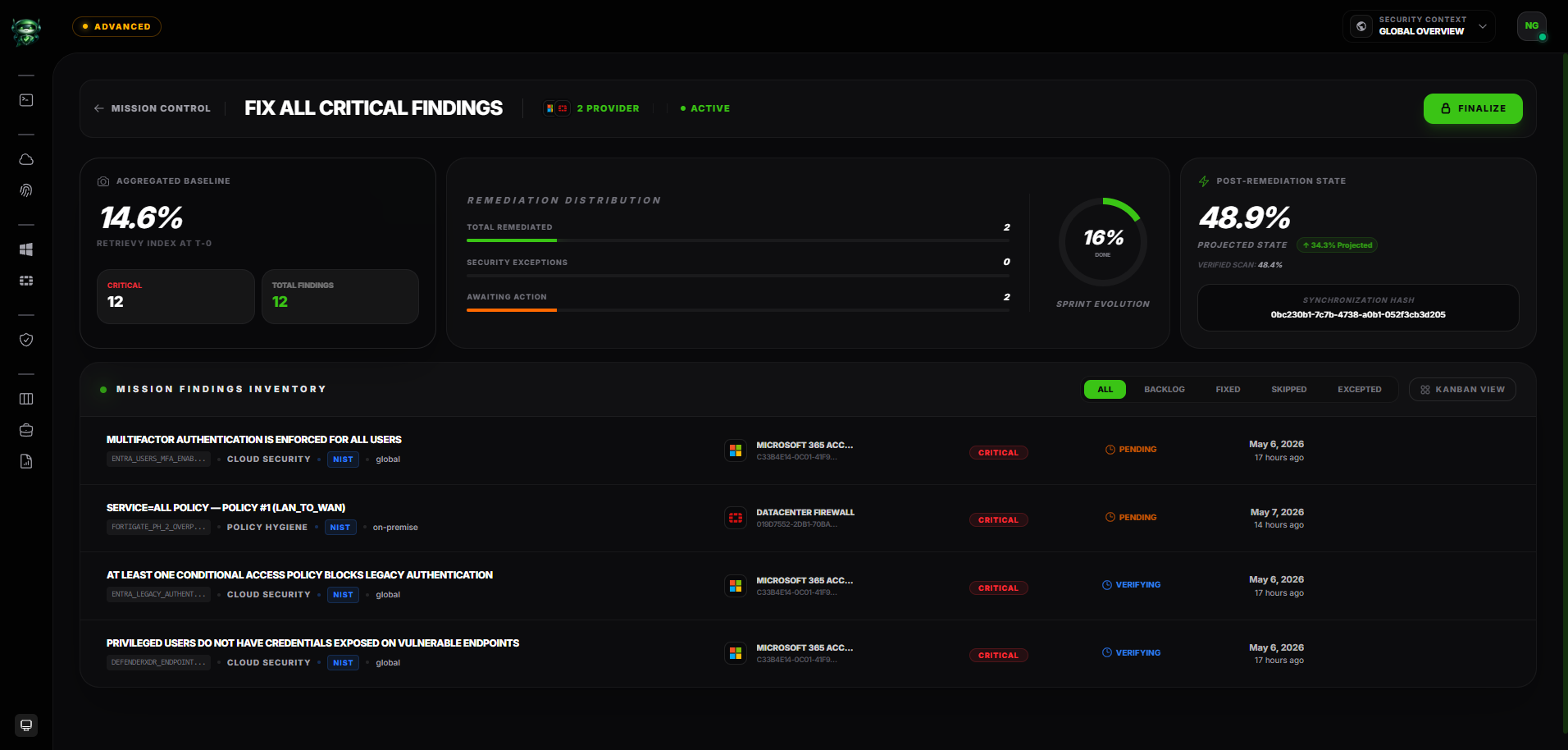
One project, many findings.
Bundle related findings under a single project. Use it for "deprecate every Kerberoastable account this quarter", "remediate the EU cloud baseline before audit season", or "clean up the FortiGate rule debt".
Owner. Deadline. Observation log.
Each project has an accountable owner, a target date, and a chronological observation log: who changed what, when, and why. The audit trail is intact by default.
Auto-generate a PDF on close.
When the project closes, Retrievy renders a PDF report. Scope, finding inventory, before-and-after posture, observation timeline. Hand it to your auditor without writing a single line.
Trust but Verify, project-wide.
Findings inside a project still follow the scan-verified status model. The next scan promotes them to Resolved. The project closes when every finding it contains is verified.
Six frameworks, one identity finding.
Microsoft 365, Google Workspace, GitHub and on-prem Active Directory checks roll up to the same standards your auditors and your board care about.
CIS Microsoft 365 v4.0 / v6.0, CIS Google Workspace v1.3, CIS GitHub v1.0. Every identity check tied to a CIS Control ID and the platform-specific section.
Govern, Identify, Protect, Detect functions. Account-management and access-control categories mapped per finding, with conditional access and MFA gaps surfaced at the category level.
T1558 (Kerberos), T1078 (Valid Accounts), T1003 (Credential Access), T1098 (Account Manipulation) and adjacent identity techniques surfaced from the finding payload.
ISPM, answered.
Run the identity assessment that matches your question.
This hub explains the category. These two pages describe the assessment itself: what is collected, what evidence supports each finding, and how a correction is verified.
Find the Tier Zero
you don't know about.
Install the agent in five minutes. The first identity audit appears the same day.
Try everything free for 14 days on your own data. Request your trial code. No credit card required.