Group Policy is your
real control plane.
Audit it like one.
Retrievy audits Active Directory continuously: 98 CIS Microsoft Windows Server checks against the Domain Controller and 44 Active Directory checks covering Kerberos exposure, delegation, certificate templates and Tier 0 membership. On top of that sits GPO X-Ray, which resolves Group Policy the way the client does, shows which control each scope actually meets, and lets you model a change before you make it.
Read-only, installed on a Domain Controller in about five minutes, with no service account and no Domain Admin.
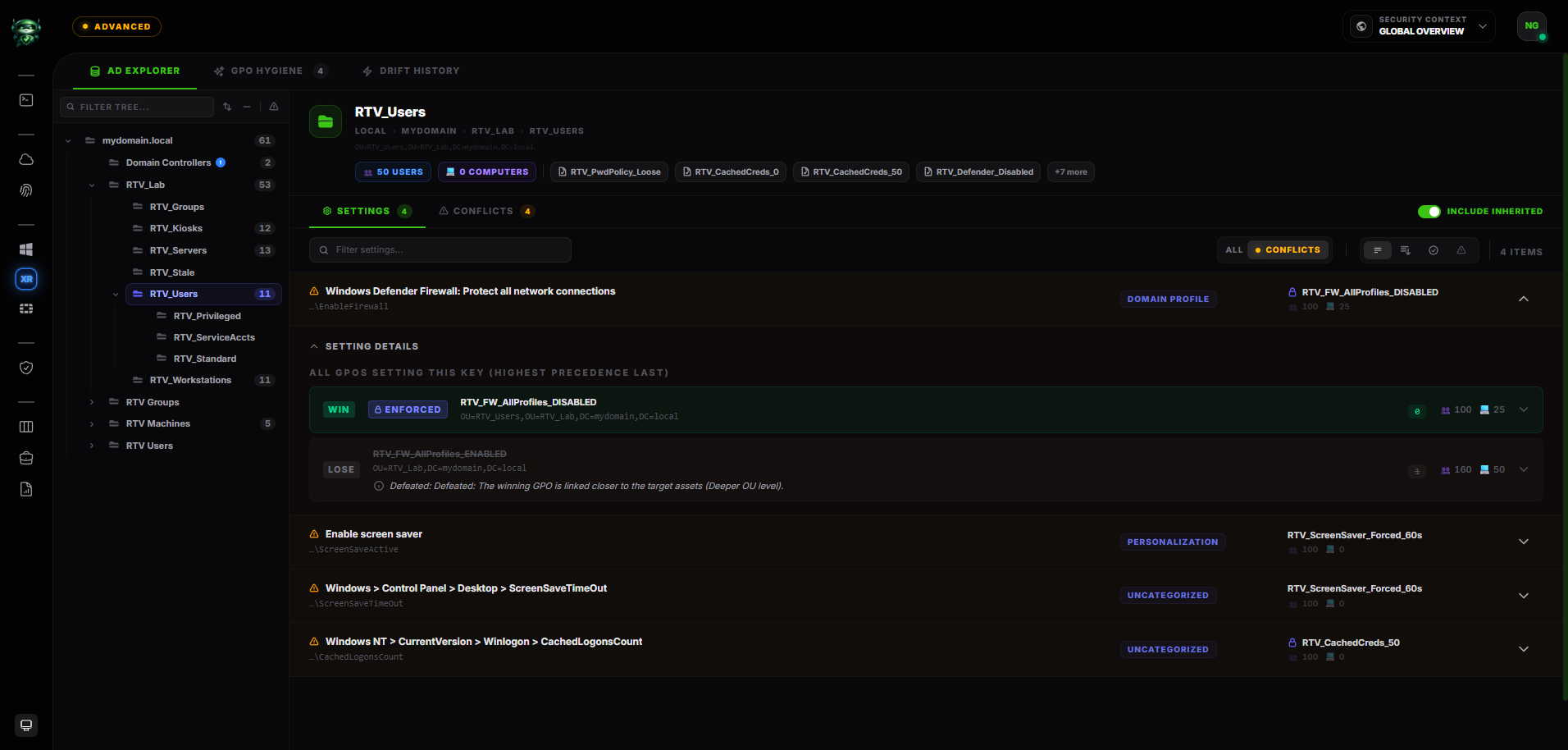
GPO X-Ray · AD Explorer. Every setting with its applied value, the GPO that won, and the reach it actually has.
GPMC shows you the links, not the outcome.
The Group Policy Management Console lists your GPOs and where they are linked. It does not tell you which setting wins after Local, Site, Domain and OU resolution with Enforced links and Block Inheritance in play. It does not tell you which OUs a baseline fails to reach. It does not tell you that a value changed last Tuesday.
Meanwhile the directory itself accumulates the things that actually get exploited: a service account with an SPN and a weak password, a computer left with unconstrained delegation, a certificate template any authenticated user can enrol against, an ACL on AdminSDHolder that nobody remembers adding.
Retrievy reads both planes, continuously, and shows the outcome instead of the configuration.
One installer.
Both lenses.
The same Windows agent feeds identity posture (ISPM) and configuration audit (SCM). Install it once on a Domain Controller and both light up.
The agent reads LDAP with the domain controller's own machine credentials and reads local configuration without modifying it. Evidence is signed and encrypted before it leaves the host.
~40 MB installer
Single-file, code-signed package. No .NET runtime prerequisite on the target.
Token onboarding
Paste an install token from the dashboard. The agent self-registers on its first heartbeat.
Outbound HTTPS only
No inbound ports, no exposed services. Works through corporate proxies.
Daily collection
Runs at 00:01 by default and is configurable. Heartbeats every five minutes, and a missed heartbeat escalates.
Signed evidence
Payloads are signed with an RSA-4096 key held on the host, so the platform can prove which agent produced them.
Encrypted offline queue
A connectivity blip caches encrypted on disk and retries. Nothing is lost and nothing is sent twice.
Code-signed auto-update
The agent updates itself in place. You install once.
No credentials to manage
LDAP uses the host's Kerberos machine credentials. There is no service account to create and no directory password to store or rotate.
44 Active Directory checks,
named after what they catch.
These are the paths that get used in a real intrusion, not a generic hardening list. Each one is a distinct check with a stable identifier, a severity, an owner and a verification step.
Kerberos and credential exposure
8The tickets and hashes an attacker collects first, and the account settings that hand them over.
- Kerberoastable service accounts
- AS-REP roastable accounts (pre-auth disabled)
- krbtgt password age
- DES-only Kerberos encryption
- Domain controllers without supported encryption types
- Reversible password encryption enabled
- Passwords stored in directory attributes
- GPP cpassword exposed in SYSVOL
Delegation and privilege escalation
8The four delegation shapes that turn a member server into a path to Domain Admin.
- Unconstrained delegation on computers
- Unconstrained delegation on users
- Constrained delegation with protocol transition
- Resource-based constrained delegation (RBCD)
- DCSync rights granted outside Tier 0
- Dangerous nested group membership
- primaryGroupID anomalies
- SID history populated
Certificate services (AD CS)
3Certificate templates that let any authenticated user request a certificate for somebody else.
- Vulnerable certificate template
- ESC2 — any-purpose template
- ESC3 — enrolment agent template
Tier 0 and privileged groups
8Who holds the keys, who quietly kept them, and what protects the objects that matter.
- AdminSDHolder ACL modified
- Enterprise Admins excessively populated
- Schema Admins populated
- adminCount orphans
- Protected Users group not in use
- Inactive administrator accounts
- Crown-jewel reach
- Pre-Windows 2000 Compatible Access group
Domain and account policy
8The settings that were correct at migration and were never checked again.
- Weak password policy
- Password never expires
- Password not required
- Domain functional level
- MachineAccountQuota above zero
- Guest account enabled
- LAPS not deployed
- Dangerous domain trusts
Domain controller and estate hygiene
8The host itself, and the objects nobody removed.
- SMB signing not enforced on DCs
- Print Spooler running on a domain controller
- Domain controller on an unsupported OS
- Stale computer objects
- Orphaned GPOs
- Empty GPOs
- Shadowed GPOs
- GPO delegation to non-privileged principals
Registry values, account policy, advanced audit policy, user-rights assignment and security options, each tied to its CIS control identifier and each rolling into the module score.
A check that cannot read what it needs reports as uncertain, never as a pass. A coverage gap is shown as a coverage gap, because silence counted as compliance is how a report ends up wrong in the direction that matters.
Resolve policy
the way the client does.
Local, Site, Domain, OU.
For every setting you get the value that applies, the GPO that set it, the GPOs it beat and why they lost, and how many users and computers it reaches.
"If I change this, who is affected?"
Each policy carries the user and computer set it actually reaches, including everything pulled in by inheritance, so the blast radius of an edit is a number you can read before you make it.

Coverage. Which scope meets which control, and which are blocked by inheritance.
"We have a baseline"
is not the same as "it applies".
A baseline GPO that exists, is linked, and still fails to reach half the estate is the most common finding in a mature domain. Coverage grades every scope against every control in the baseline and tells you which of five states it is in.
A policy delivers the control to this scope, and the resolved value satisfies it.
A policy that would satisfy the control already reaches the scope, and Block Inheritance is stopping it. The cheapest class of gap to close.
More than one policy sets the value and the winner does not satisfy the control.
No policy in scope sets this control at all.
The evidence collected cannot decide it. Reported as a gap in coverage, not as a pass.
A CIS Windows Server GPO subset and Retrievy's own policy-delivery essentials ship with the product, and a scope can be graded against either or both.
Rows are ranked by how much each gap matters rather than by how many there are, and Blocked comes first: the policy already exists and only the inheritance is in the way.
Model the change
before the change window.
Disable a GPO, unlink it, move an OU, flip Block Inheritance. The Simulator evaluates the proposal with the same engine that answers the AD Explorer and shows you the difference: which settings change value, which GPO takes over from which, where in the directory the effect lands, and what stays uncertain.
Still read-only. Nothing the Simulator does reaches Active Directory. The output is evidence for your own change process: what you expect to happen, written down before you make the change, and comparable against the next collection afterwards.

Simulator. Saved scenarios, proposed operations, and a diff against the current effective policy.
The two jobs
nobody schedules.
Orphaned, empty, shadowed, contested.
Twenty years of Group Policy leaves objects behind: GPOs linked nowhere, GPOs with no settings, GPOs fully overridden by another, and settings contested by two policies at once. Each one is listed with the evidence for why it qualifies and a consolidation plan for what to do about it.
- Orphaned GPOs with no live link
- Empty GPOs that deliver nothing
- Shadowed GPOs fully overridden downstream
- Contested settings with a losing winner
- Consolidation candidates that duplicate each other
- Delegation on a GPO to a non-privileged principal
What moved, where it lands, when it started.
Every collection is compared against the last. Routine patching is filtered out before the comparison, so a normal month produces no noise. A real change produces a record with the field-level before and after, the scope it reaches, and the time it first appeared.
Registry path, GPO path,
and the reason it matters.
Without required SMB signing, authentication captured from any client can be relayed to a Domain Controller. That is the short path from a single workstation foothold to directory-level privilege.
HKLM\SYSTEM\CurrentControlSet\Services\LanmanServer\Parameters
RequireSecuritySignature = 1 (DWORD)Computer Configuration → Policies → Windows Settings →
Security Settings → Local Policies → Security Options →
"Microsoft network server: Digitally sign communications (always)"
→ Enabled- → CIS Microsoft Windows Server, Domain Controller profile
- → NIST SP 800-53 Rev 5 · System and Communications Protection
- → MITRE ATT&CK T1557.001 · LLMNR/NBT-NS Poisoning and SMB Relay
Every finding carries the registry path, the Group Policy path and the reason the control exists, so the engineer fixing it does not need a benchmark PDF open on a second monitor.
Findings move Triage → Verifying → Hardened, and only the next collection can promote one to Hardened. Nothing closes on somebody's word.
Group findings.
Ship a sprint.
Some fixes are quick. Others are quarterly initiatives. Multi-finding cleanup work that needs an owner, a deadline, and an audit-ready report at the end. That's a Remediation Project.
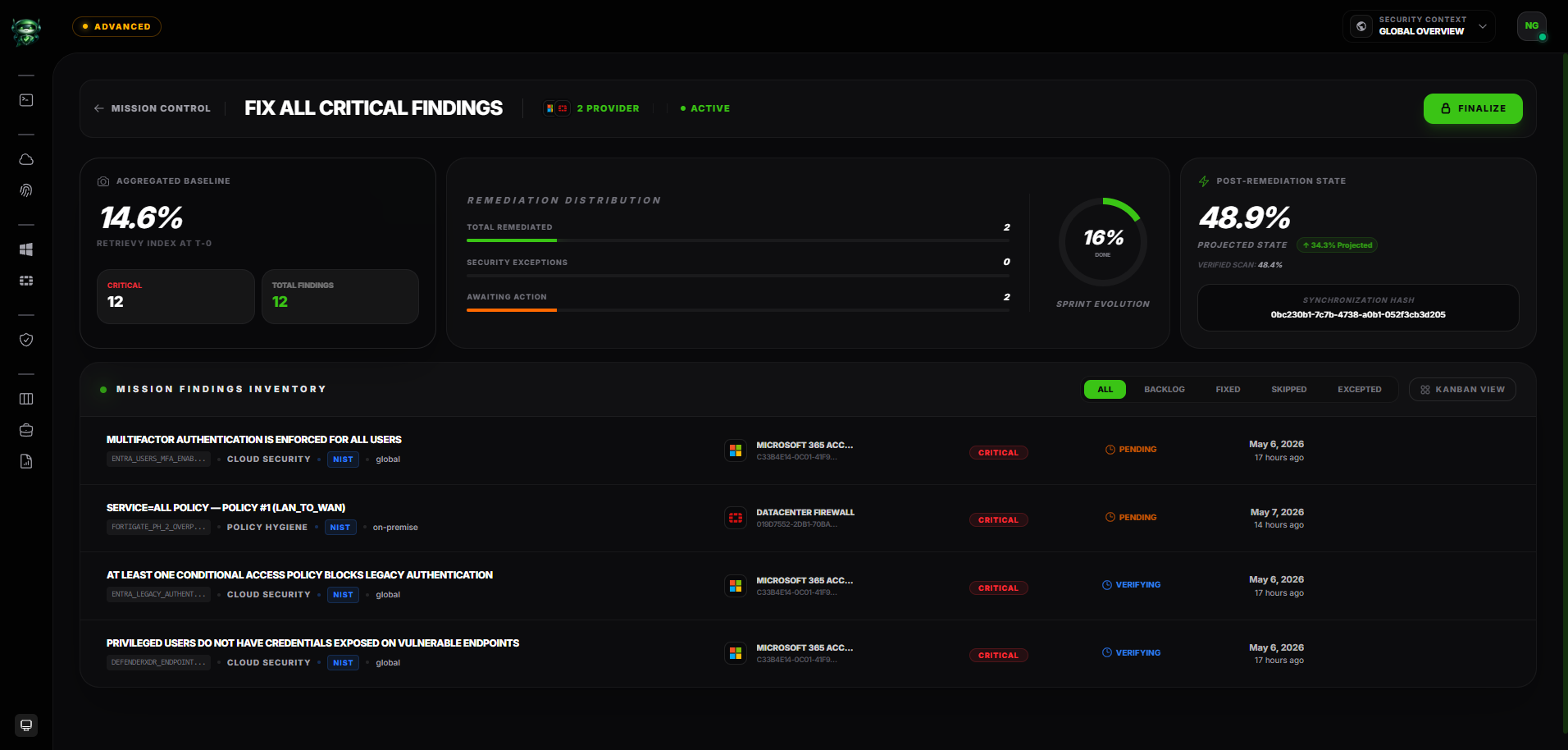
One project, many findings.
Bundle related findings under a single project. Use it for "deprecate every Kerberoastable account this quarter", "remediate the EU cloud baseline before audit season", or "clean up the FortiGate rule debt".
Owner. Deadline. Observation log.
Each project has an accountable owner, a target date, and a chronological observation log: who changed what, when, and why. The audit trail is intact by default.
Auto-generate a PDF on close.
When the project closes, Retrievy renders a PDF report. Scope, finding inventory, before-and-after posture, observation timeline. Hand it to your auditor without writing a single line.
Trust but Verify, project-wide.
Findings inside a project still follow the scan-verified status model. The next scan promotes them to Resolved. The project closes when every finding it contains is verified.
One finding, every framework it touches.
A domain controller, Group Policy or directory finding carries its framework mappings with it, so the same evidence answers an auditor and an engineer without being rebuilt for either.
Windows Server 2016, 2019, 2022 and 2025, Domain Controller profile. Level 1 and Level 2 controls, each finding tied to its official CIS control identifier.
Govern, Identify, Protect and Detect functions, with SP 800-53 Rev 5 control families (Access Control, Identification and Authentication, Audit and Accountability) alongside.
T1558 (Steal or Forge Kerberos Tickets), T1557 (Adversary-in-the-Middle), T1484 (Domain Policy Modification), T1003 (OS Credential Dumping), T1098 (Account Manipulation) and T1078 (Valid Accounts).
Forty-four checks covering delegation abuse, Kerberos exposure, AD CS templates, Tier 0 membership, domain policy and estate hygiene. The operational risk the published standards do not name.
Active Directory audit, answered.
Run the Active Directory assessment that matches your question.
This page explains the module. These two describe the assessments themselves: what the agent collects, what the evidence supports, and where collected analysis stops short of endpoint resultant-set-of-policy.
See your directory
as it actually resolves.
Install the agent on a Domain Controller in about five minutes. The first GPO X-Ray, coverage grade and hardening report land the same day.
Try everything free for 14 days on your own data. Request your trial code. No credit card required.