FortiGate Security Posture
and Policy Analysis
Your FortiGate runs on the box, not on a checklist.
Retrievy analyzes what the firewall actually enforces: the admin plane, the inspection profiles, VPN posture, and the policy set itself. CIS verifies a profile is attached. Retrievy verifies it is effective, then lets you simulate a flow through the live rule set before you change it. 133 checks in total: 64 CIS benchmark controls, 50 Layer-7 inspection-efficacy checks across SSL, AV, IPS, AppControl, WebFilter and DNS, 8 security-profile coverage checks, 6 rule-hygiene checks, and 5 administrator-access checks. Policy X-Ray shows the Domino Effect, the read-only simulator models policy changes, and the cleanup engine identifies rules that need review.
Need a complete configuration and policy review? See the FortiGate Security Audit.
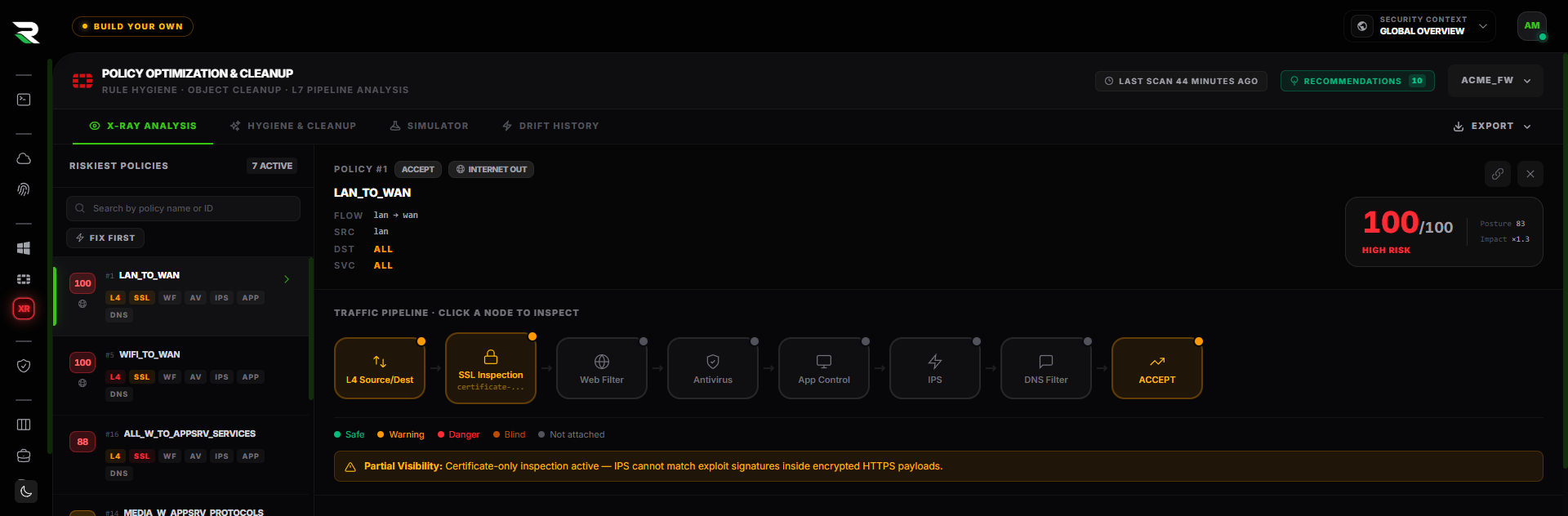
Policy X-Ray. Every rule scored, its Layer 7 pipeline traced node by node.
Green dots lie.
The GUI shows a green dot next to "WebFilter Profile". The CIS report says "WebFilter is attached". And the user is still browsing to phishing pages, because the WebFilter profile in question allows the FortiGuard category "Newly Observed Domains", or the policy underneath it has SSL deep inspection disabled, or the FortiGuard subscription quietly expired three weeks ago.
Zombie rules accumulate. Default profiles linger. Certificate hygiene decays. SSL inspection has a single misconfigured exception that blinds half the rule set.
Retrievy reads the live device and tells you what's actually working.
SSH read-only.
Three minutes per device.
A thin collector. The platform does the work.
The collector connects to your FortiGate over a read-only SSH session, gathers the configuration, encrypts it, and ships it to the Retrievy platform. All analysis runs server-side. The host running the collector stays light, and your firewall is never written to.
- ·Windows agent or Docker container. Same collector, same auth, same offline queue. Pick whichever fits your environment.
- ·Read-only admin profile. No write privilege, no API tokens that grant write, no inbound on the firewall, no agent on the FortiGate itself.
- ·Outbound HTTPS only. The collector sends data to Retrievy. No inbound exposure on the firewall or the host.
- ·Encrypted credentials at rest. FortiGate SSH credentials sealed to the host. Tokens rotate automatically.
- ·Snapshot and diff on every scan. Each scan captures a fresh config snapshot and compares it against the prior one, so the Drift Engine reports a real change as a single, accurate event.
- ·Add a second device in 30 seconds. Same credentials profile reused. Add an entire fleet in an afternoon.
vs. FortiManager
FortiManager shows you the intended configuration. Retrievy reads the live device. When the two diverge, Retrievy flags it.
Cluster-aware.
Reads from the active member. Cluster sync state surfaced in the dashboard. Drift between members is flagged before failover surprises you.
133 checks,
five engines, one device.
50 deep-inspection checks.
Six UTM domains. Past the attached/not-attached question.
Audits whether the profile is actually doing its job: SSL depth, AV outbreak prevention, IPS critical-severity actions, AppControl unknown-traffic handling, WebFilter FTGD coverage, DNS botnet blocking, DLP PII detection.
The whole benchmark, not a subset.
System settings and the admin plane (password policy, idle timeout, trusted hosts, encrypted access only, login banners, NTP, SNMPv3, default-admin removal, certificate validity), plus network settings, policy and object controls, security profiles, logging and reporting, VPN posture and Security Fabric. Each finding carries its benchmark control identifier.
IPsec & SSL VPN.
Cipher inventory, dial-up policy hygiene, weak-cipher detection, split-tunnel review.
Segmentation hygiene.
VLAN segmentation, VDOM scope, default-gateway sanity, routing posture (BGP/OSPF).
Telemetry sanity-check.
Syslog targets, log-disk usage, retention windows, FortiAnalyzer integration health, encrypted-log enforcement. The signal-loss vector that defeats incident response.
Action Board + Classic Matrix.
Action Board ranks policies by risk (ISDB-weighted destinations); Classic Matrix renders the L4 traffic + L7 node status dashboard. Two views, one X-Ray.
Cascading L7 blindness, surfaced.
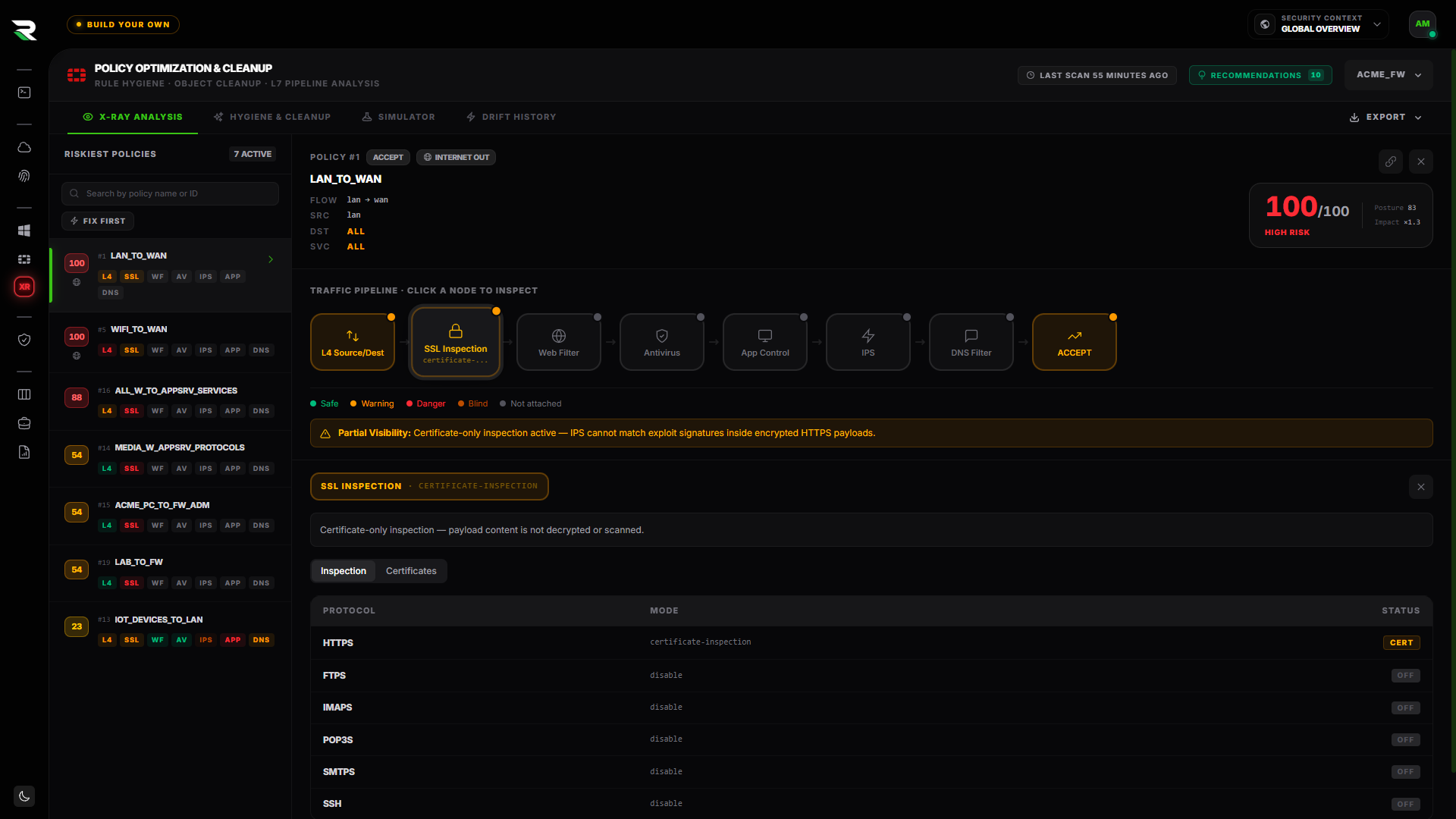
A gap in SSL inspection cascade-blinds every downstream L7 control on HTTPS (WebFilter, AV, IPS, AppControl). The Action Board renders the propagation per policy, so the root-cause fix is one click.
Zombies. Stale rules. Shadows.
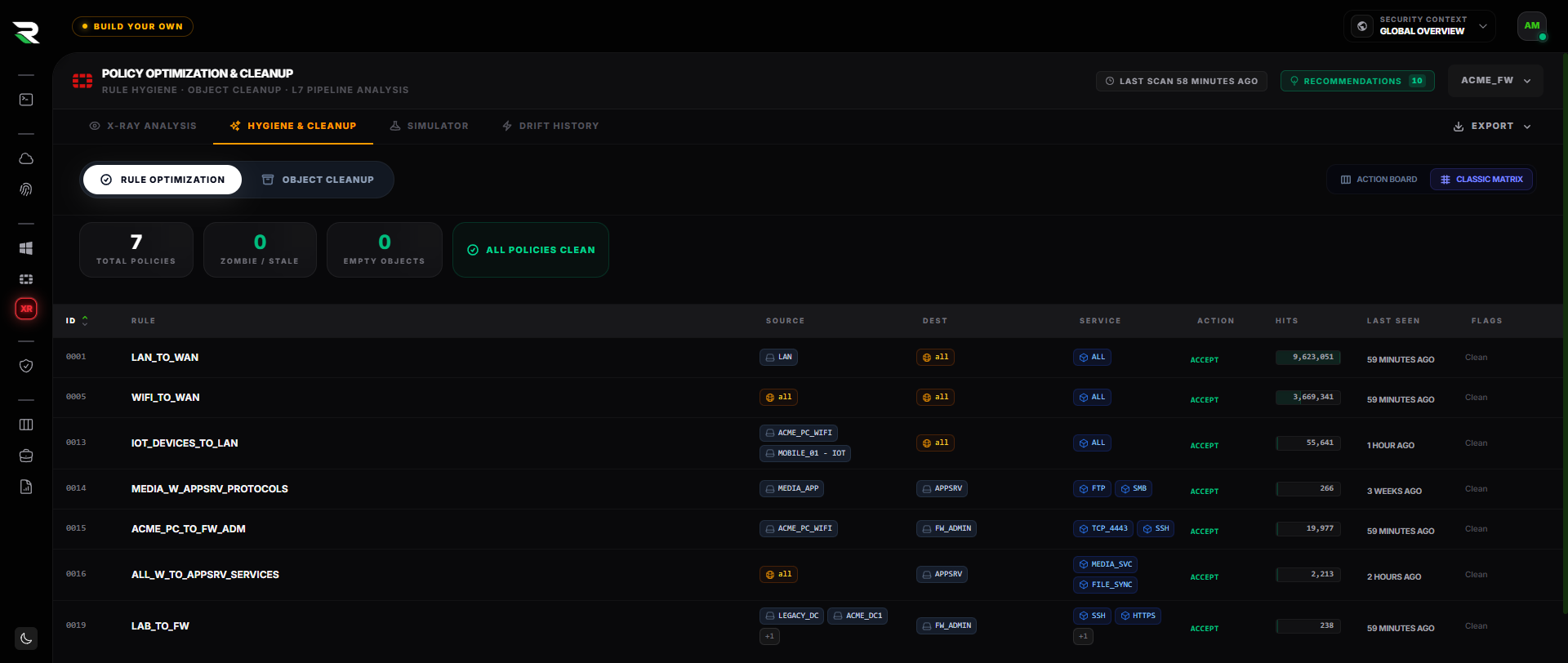
Hit_count = 0 with traffic telemetry collected (zombie rules), last_used_at > 90 days (stale rules), broader policies earlier in the rule list (shadowed rules), broken address objects, dependency-resolved unused profiles. The cleanup nobody dared start, scoped.
Who can actually administer it.
Five checks on the admin plane itself: which accounts hold privileged membership, which paths escalate into it, delegation inherited from a directory group, remote groups that no longer resolve, and whether the device can even enumerate its own administrators.
Click a node.
See what is really configured.
Test the change
before you touch the firewall.
Every firewall change is a small act of faith. You edit a rule, push it, and hope nothing three rules down quietly breaks. The simulator removes the faith. Describe a flow, and Retrievy traces it through the live rule set the way FortiOS would, then tells you what actually happens, and what would still happen if you deleted the rule.
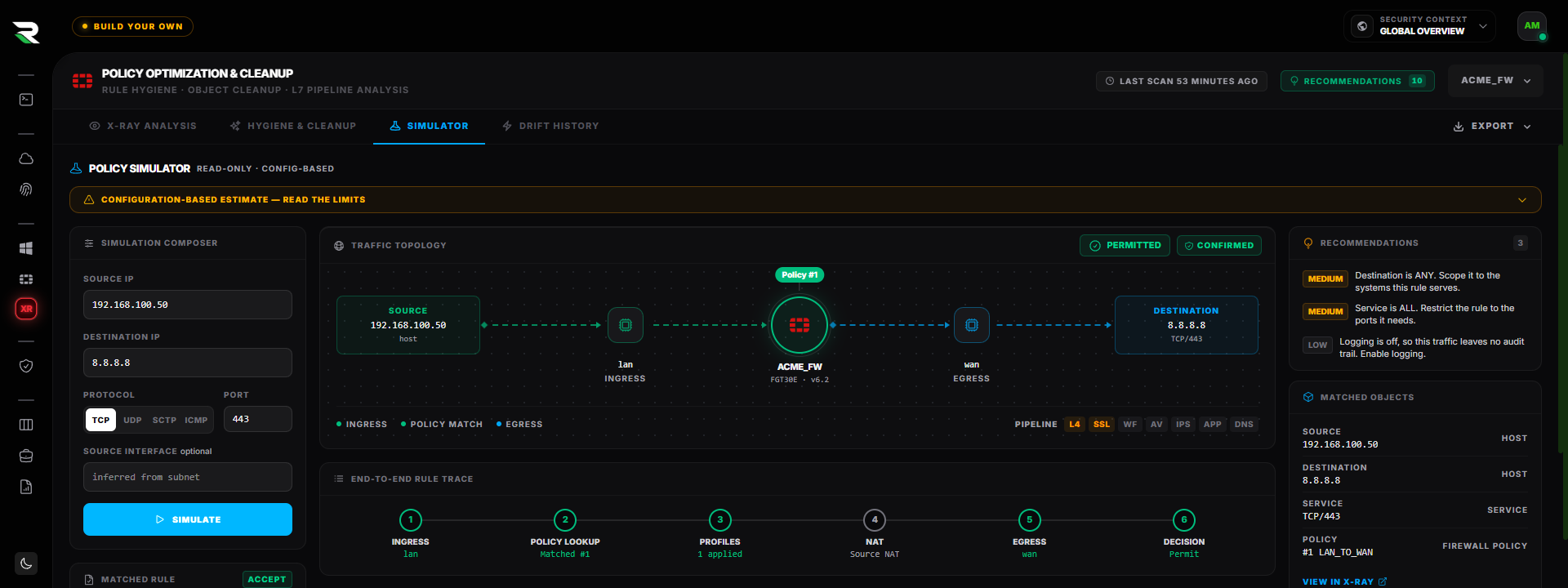
A permitted flow from the LAN to the internet, traced end to end, with the matched rule and its confidence grade.
The whole path, not a guess.
Interface and route lookup, first-match policy, NAT, then egress. The full path a packet takes, drawn as a topology with the matched rule called out. When the flow is blocked, the traffic stops at the firewall and the verdict turns red. No ambiguity about what would have happened.
It tells you what it cannot see.
A config-only simulator reasons from the saved device state. Matches that hinge on an authenticated user, ZTNA, an ISDB or FQDN object, or runtime routing are labelled uncertain with a caveat, never dressed up as a confident allow. Every verdict carries a confidence grade, so you know when to trust it and when to verify by hand.
What still permits it if you delete the rule.
The rule that matches first is rarely the only rule that would permit the flow. The simulator lists every rule below it that would still allow the traffic, so you know whether deleting one actually closes the path or just shifts it down the list. And it is strictly read-only. It never touches the device.
The cleanup nobody dared start,
scoped with proof.
Nobody deletes a firewall rule on a hunch. So rules accumulate for years, each one a small "probably still needed." The Hygiene board replaces the hunch with hit-count evidence: which rules matched zero traffic since telemetry began, which have been idle past the 90-day threshold, and which reference address groups that resolve to nothing.
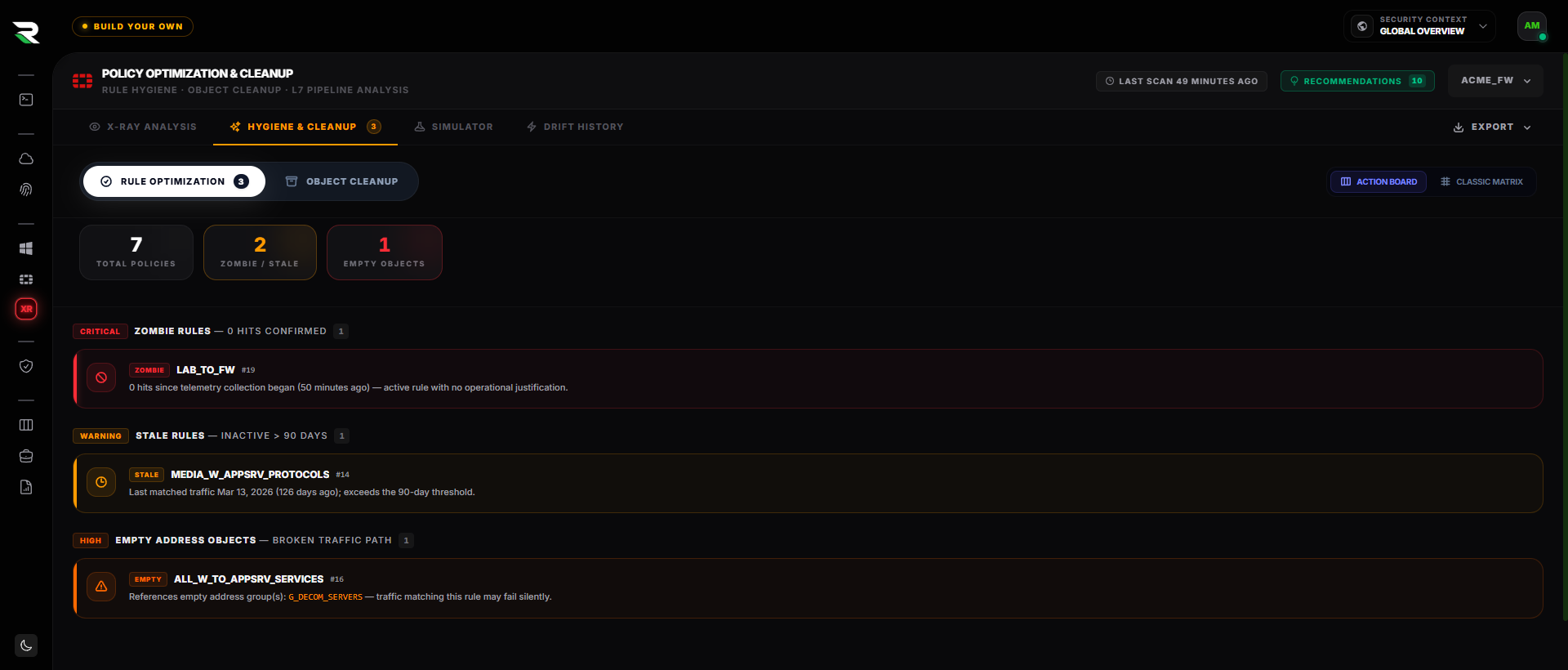
The Action Board across a 57-policy rulebase. Every row carries the evidence for why it qualifies.
Zero hits, confirmed.
An enabled rule that has matched nothing since hit-count telemetry began is an active attack surface with no operational justification. The board names it and shows how long the counter has sat at zero, so the deletion is a decision, not a gamble.
Idle past the threshold.
A rule that carried traffic once but has been silent for more than 90 days is usually a project that ended without a ticket to close it. The board shows the last-matched date and the exact idle count, ready to paste into the change request.
Empty address objects.
A policy that references an address group with no members silently matches nothing. Traffic you believe is permitted fails, and the rule that should explain it looks perfectly healthy in the GUI. The board names the empty group behind the break.
The window closed. The rule stayed.
A rule bound to a one-time schedule whose window has passed can never match again, and it will still be sitting in the rulebase at the next audit. The board dates the window, names the schedule, and tells you whether to delete the rule or rebind it.
The temporary rule that stayed.
Any source, any destination, any service, action accept. It is almost always a migration shortcut that outlived the migration, and it silently shadows every careful rule beneath it.
Rules that can never match.
A rule fully covered by a broader one above it is dead weight that still reads as policy. A rule with logging disabled is a permitted path with no record. Both are named with the rule that covers them and the traffic they would have carried.
FortiOS GUI path + CLI block.
On every finding.
Verifies that policies handling outbound HTTPS use SSL/TLS deep inspection, not certificate inspection alone. Without deep inspection, every downstream L7 control (WebFilter, AV, IPS, AppControl) is blind to HTTPS payloads.
Policy & Objects → Firewall Policy → Edit policy 47
  → Security Profiles → SSL/SSH Inspection
→ "deep-inspection" (or a custom deep-inspection profile)config firewall policy
edit 47
set ssl-ssh-profile "deep-inspection"
next
end- → Fortinet · SSL/SSH Inspection profiles
- → CIS Fortinet FortiGate Benchmark · Section 4.2
Engineers don't have to translate from CIS-speak to Fortinet-speak. Each finding ships the GUI path and the CLI block. Copy, paste, verify on the next scan.
Findings flow Triage → Verifying → Hardened. The "Trust but Verify" rule means only the next scan can promote a finding to Hardened. Exceptions live in a separate lane with expiry dates.
Group findings.
Ship a sprint.
Some fixes are quick. Others are quarterly initiatives. Multi-finding cleanup work that needs an owner, a deadline, and an audit-ready report at the end. That's a Remediation Project.
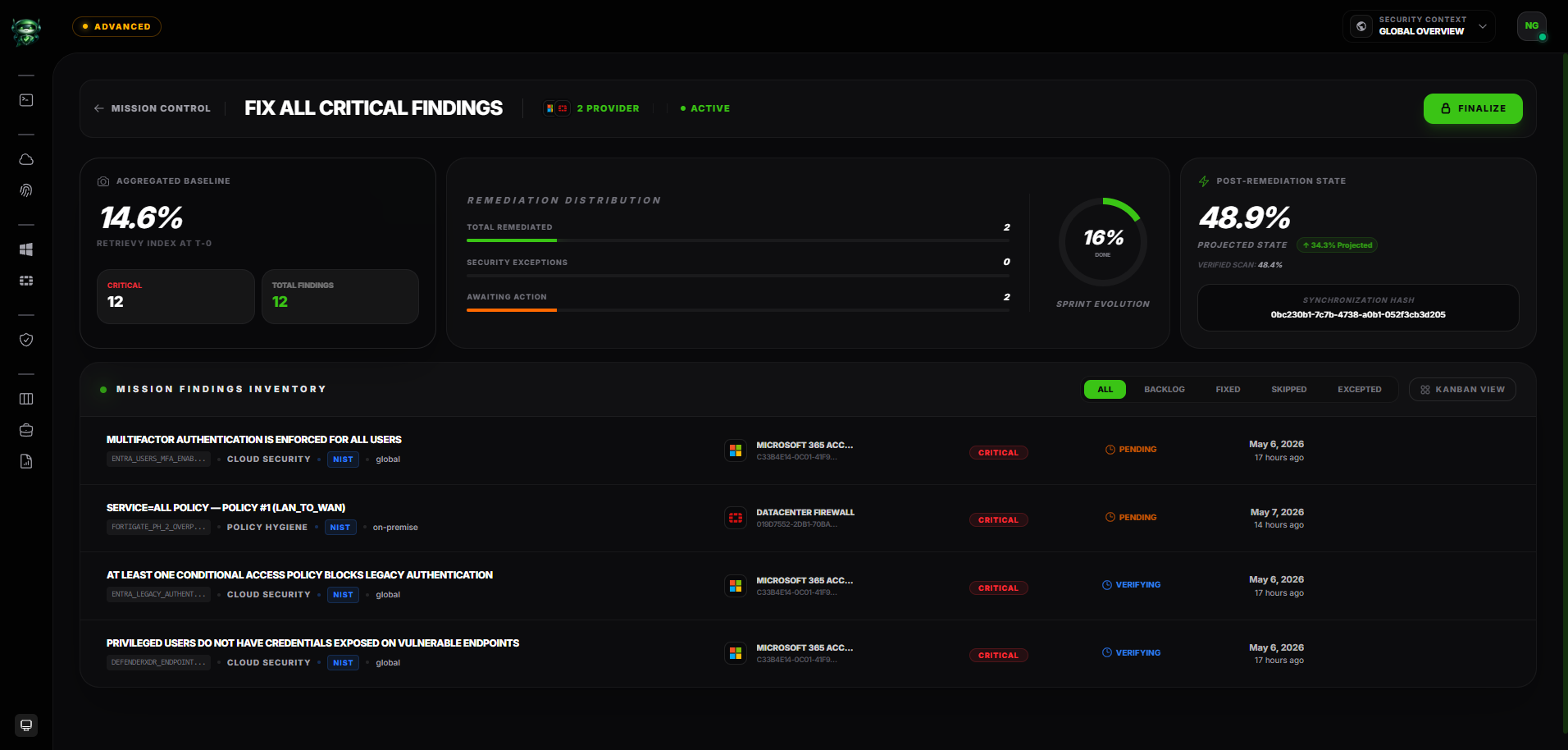
One project, many findings.
Bundle related findings under a single project. Use it for "deprecate every Kerberoastable account this quarter", "remediate the EU cloud baseline before audit season", or "clean up the FortiGate rule debt".
Owner. Deadline. Observation log.
Each project has an accountable owner, a target date, and a chronological observation log: who changed what, when, and why. The audit trail is intact by default.
Auto-generate a PDF on close.
When the project closes, Retrievy renders a PDF report. Scope, finding inventory, before-and-after posture, observation timeline. Hand it to your auditor without writing a single line.
Trust but Verify, project-wide.
Findings inside a project still follow the scan-verified status model. The next scan promotes them to Resolved. The project closes when every finding it contains is verified.
Three frameworks, one config finding.
FortiGate admin-plane and L7 inspection checks roll up to the international benchmarks and the proprietary hygiene rules that catch the risk standards leave behind.
CIS Fortinet FortiGate 7.0.x v1.4.0 and 7.4.x v1.0.x benchmarks. Full coverage of the 28 admin-plane checks plus the L7 deep-inspection sections (SSL, AV, IPS, AppControl, WebFilter, DNS, DLP, Policy).
System and Communications Protection (SC), System and Information Integrity (SI), and Access Control (AC) families mapped per finding. Network-device controls tied directly to the audit row.
Proprietary policy-hygiene engine: rule sprawl, shadowed and unused rules, any-to-any policies, idle objects, and L7 inspection gaps. Surfaces operational risk the standards do not name.
FortiGate audit, answered.
Run the FortiGate assessment that matches your question.
This hub explains the category. These two pages describe the assessments themselves: what is collected over read-only SSH, which evidence class each finding rests on, and how a change is verified.
Audit the box,
not the checklist.
Connect your first FortiGate in three minutes. The first L7 efficacy report and Policy X-Ray appear the same day.
Try everything free for 14 days on your own data. Request your trial code. No credit card required.