Assess Entra ID privilege reach before it becomes a control-plane incident.
Retrievy reads supported Entra ID and Azure relationships through read-only Microsoft Graph and Azure Resource Manager scopes, then explains who can reach a privileged role, through which grant, and what changes when you remove it.
A role list does not tell you who can become an administrator.
The Entra portal answers who holds a role right now. It does not answer who can obtain one: through a PIM-eligible assignment nobody activated this quarter, an application permission granted to a service principal, ownership of that service principal, or an Azure RBAC role that permits taking over a managed identity.
Those relationships live in different blades and different APIs. Reviewing them one at a time is how a low-privilege account with ownership of a highly permissioned application stays invisible during an access review that examined only directory role holders.
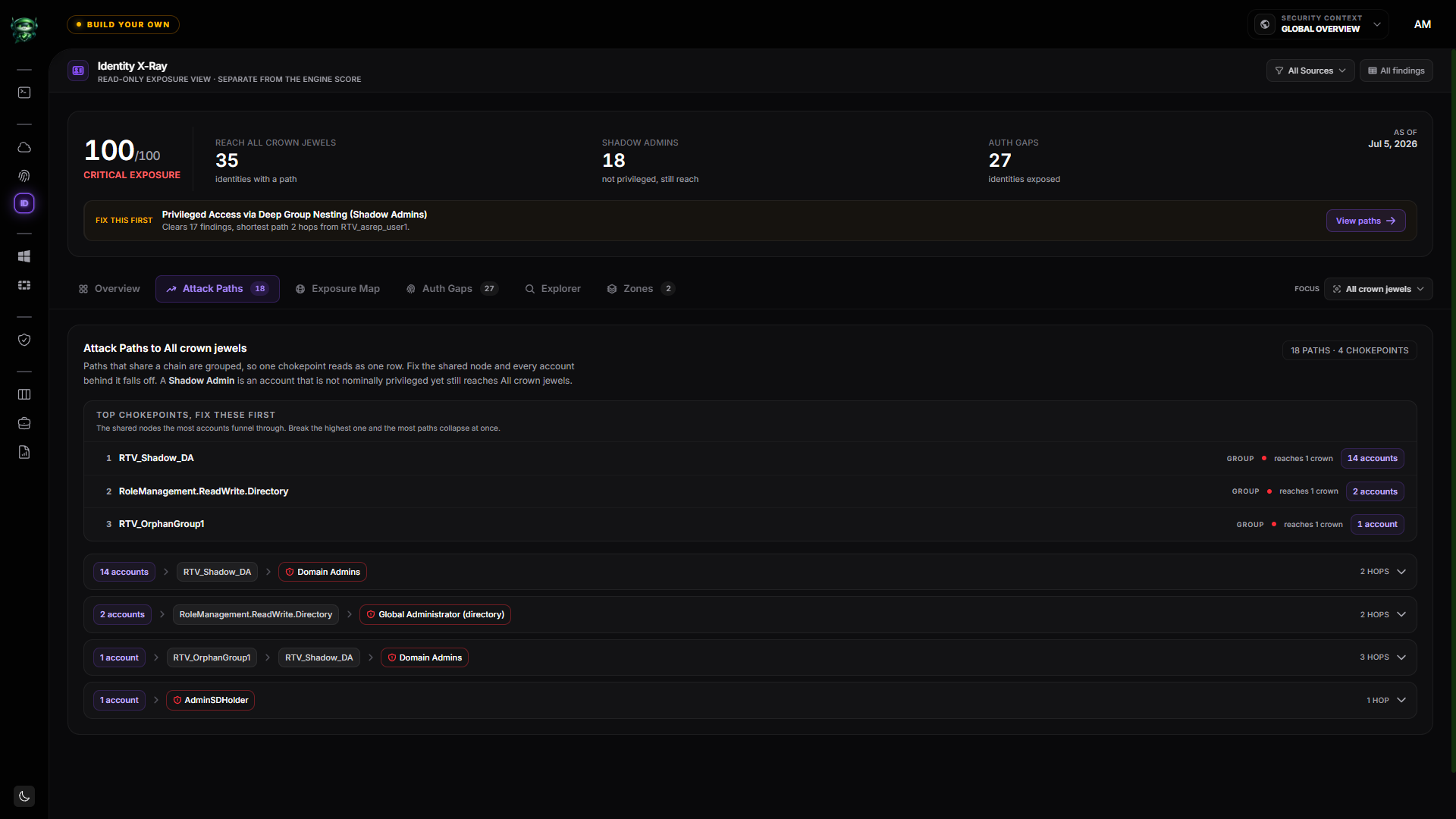
Retrievy collects the supported relationships together and reports the reachable outcome. Coverage is stated explicitly on every view. It does not claim that a source without collected evidence is safe.
Four relationship families, read together.
Each is collected read-only and reported with the evidence it came from.
Standing and PIM-eligible roles
Directory role assignments, both active and eligible. An eligible assignment nobody has activated is still a path to the role, and it is reported as one.
Graph application permissions
Application and delegated permissions granted to service principals, highlighting the grants that permit directory writes, credential management, or role assignment.
Service principal ownership
Who owns an application or service principal. An owner can add credentials to it, which makes ownership of a highly permissioned application equivalent to holding its permissions.
Azure RBAC and managed identities
Subscription and resource-group role assignments, including the relationships that allow assigning roles or taking over a managed identity attached to a resource.
What the assessment surfaces.
Every item below is derived from collected configuration, not from live exploitation.
Shadow administrators
Identities that reach a privileged outcome without holding a privileged role directly, through ownership, an application grant, or an eligible assignment.
Excessive application grants
Service principals holding permissions far broader than their apparent use, including grants that permit writing to the directory.
Credential-addable applications
Applications whose owners can add a secret or certificate, which converts ownership into authentication as the application.
Standing privilege that could be eligible
Permanent role assignments where a PIM-eligible assignment would reduce standing exposure.
Crown-jewel reach
Which of your marked privileged zones a given identity can reach, and which single relationship collapses the most paths.
Coverage state
Which scopes were collected and which were not, shown beside the findings rather than buried in a report footer.
Read-only collection, then a verified correction.
-
1
Step 1
Connect read-only
Consent to read-only Microsoft Graph and Azure Resource Manager scopes. Retrievy never requests write permissions and never modifies your tenant.
-
2
Step 2
Collect the relationships
Role assignments, eligible assignments, application permissions, ownership, and Azure RBAC are collected and normalized into one graph.
-
3
Step 3
Review reachable privilege
Inspect who reaches what, through which grant, with the evidence attached to each step of the path.
-
4
Step 4
Remediate and verify
Assign an owner, apply the change in Entra, then let a later scan confirm the path is gone rather than assuming it.
A path an access review would miss.
A contractor account holds no directory role. An access review of role holders returns nothing for it.
- Ownership
- The account owns an application registration used by a reporting integration.
- Application permission
- That application holds a Graph application permission allowing directory writes.
- Credential path
- An owner may add a client secret to the application it owns.
Analysis
Ownership plus a directory-write grant means the account can authenticate as the application and act with its permissions. The reachable outcome is privileged even though the account itself holds no role.
Remediation
Remove the ownership, or reduce the application permission to the narrower scope the integration actually uses.
Verification
The next scan reports whether the relationship is gone. The finding closes on collected evidence, not on the ticket being marked done.
What this assessment does not do.
It is not exhaustive Entra coverage
Retrievy models the relationship families listed above. Entra is large, and an absence of findings means no path was found in the collected evidence, not that none exists.
It does not test exploits
Nothing is attempted against your tenant. Findings are derived from configuration and grant relationships, which is why they are safe to run continuously.
It does not change your tenant
Collection is read-only by design. Remediation is described and tracked; the change itself is made by your team.
It reports its own coverage
Where a scope was not collected, the assessment says so. It does not claim that a source without collected evidence is safe.
Questions the assessment can answer with evidence.
- Who can reach Global Administrator without currently holding it?
- Which service principals hold application permissions that permit directory writes?
- Who owns each highly permissioned application registration?
- Which PIM-eligible assignments have never been activated but still grant reach?
- Which Azure role assignments allow taking over a managed identity?
- Which single relationship, removed, collapses the most privileged paths?
Continue with the relevant solution and technical guidance.
Related Retrievy solutions
Related security guidance
Entra ID Security Assessment, answered.
1. What permissions does the assessment require?
2. Does a clean result mean the tenant is secure?
3. How is this different from an access review?
4. Does it cover on-premises Active Directory too?
5. How is a finding closed?
See who can reach privilege in your Entra tenant.
Connect read-only scopes, review the collected relationships, then verify the correction with fresh evidence.