FortiGate Firewall Rule Cleanup for Shadowed, Stale, and Overly Broad Policies
Retrievy reads the live FortiGate configuration over read-only SSH and classifies each policy by what the evidence actually supports, so you know which findings you can act on from configuration alone and which need traffic telemetry first.
For a broader review of the device configuration, see the FortiGate Security Audit.
For Policy X-Ray and deeper policy analysis, explore FortiGate security posture and policy analysis.
Rule sets grow. Nobody wants to be the one who deletes the wrong line.
Every policy set accumulates rules whose owner left, whose application was decommissioned, or which were widened during an incident and never narrowed again. They stay because deleting a rule that turns out to matter is a production outage, and proving a rule does not matter is tedious.
The tedium comes from mixing questions that have different kinds of answer. Whether a rule is shadowed by an earlier one is answerable from configuration. Whether a rule is unused is not, because that is a question about traffic. A configuration snapshot alone does not prove that a rule is unused.
Retrievy separates them. Each finding states the evidence class it rests on, so you can act immediately on the configuration-derived ones and collect telemetry before touching the rest.
Three classes of finding, three kinds of evidence.
The classification is the point. It tells you how much confidence a finding carries.
Shadowed rules
Configuration-derived reachability analysis. An earlier policy fully covers a later one, so the later rule can never match. This is decidable from the configuration alone.
Overly broad rules
Configuration findings. Any-to-any source and destination, unrestricted service, or a scope far wider than the neighbouring policies. Also decidable from configuration.
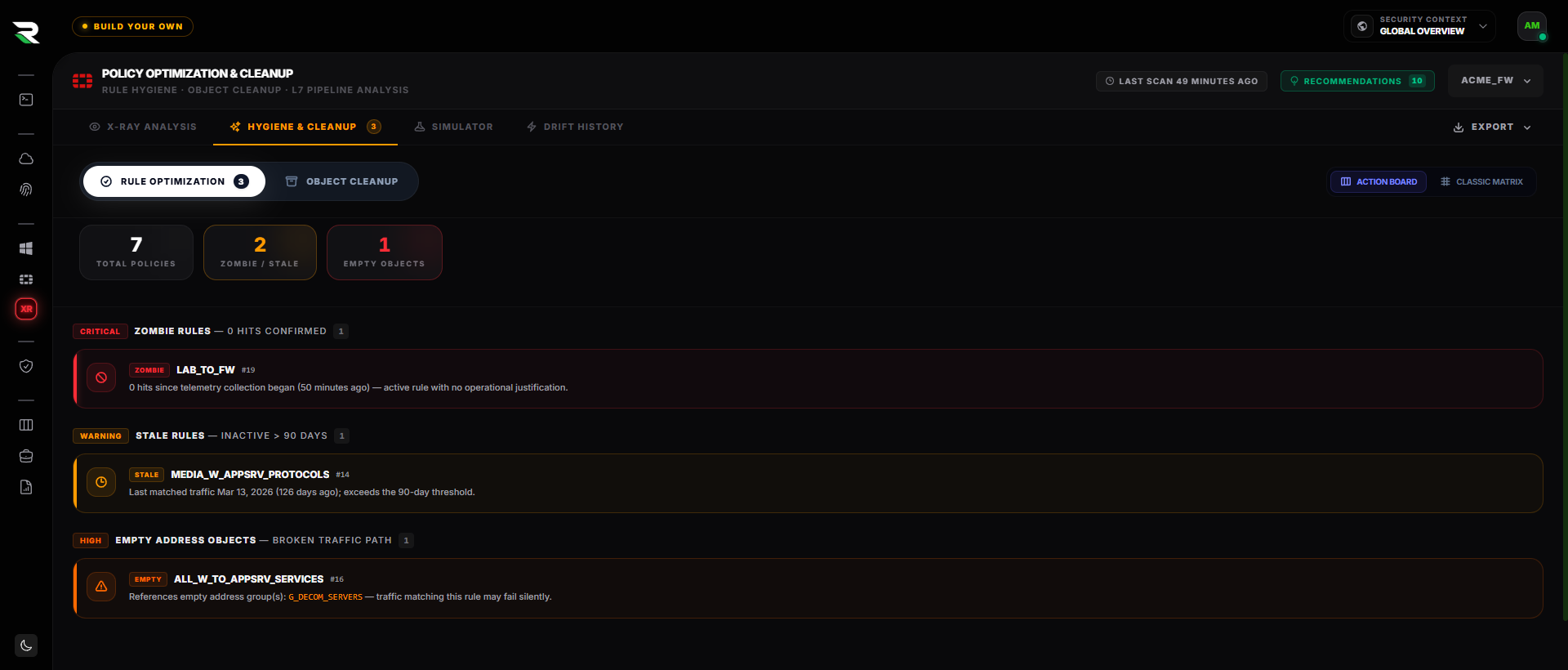
Zero-hit, zombie and stale rules
These require configured policy telemetry. Without hit counters enabled and a meaningful observation window, Retrievy reports the rule as unverified rather than as unused.
Every finding states its evidence class
Each result says whether it rests on configuration alone or needs collected telemetry, so you know which findings you can act on today and which need an observation window first.
Collected from the running configuration.
Read-only SSH collection of the full configuration, not a sampled export.
Policy table and order
Every policy in evaluation order, which is what makes shadowing decidable rather than guessed.
Address and service objects
Resolved group membership, so an any-equivalent expressed through a group is recognised as broad.
Interface and zone bindings
Which pairs a policy actually applies between, so scope comparisons are meaningful.
Security profile attachment
Whether a permissive rule also lacks inspection, which changes how urgent narrowing it is.
Hit counters where configured
Used only to support usage findings, and their absence is reported rather than silently treated as zero.
Configuration drift
What changed between snapshots, so a rule widened last week is visible as a change and not just a state.
Review, disable, monitor, delete.
-
1
Step 1
Review the classification
Read each finding with its evidence class. Configuration-derived findings are actionable now; usage findings say what telemetry they still need.
-
2
Step 2
Disable, do not delete
Disabling is reversible in seconds and produces the same operational signal as deletion. This is the step that makes cleanup safe.
-
3
Step 3
Monitor a real window
Leave it disabled across a period that includes month-end, backups, and batch jobs. A week of quiet is not evidence about a quarterly process.
-
4
Step 4
Delete and verify
Remove the policy, then let the next snapshot confirm the rule set matches what you intended. Retrievy never deletes a rule for you.
Why a zero-hit rule is not automatically a dead rule.
A policy permitting a legacy application shows no hits across the observation window, and a cleanup script would flag it for deletion.
- Configuration
- The policy is reachable: no earlier rule shadows it.
- Telemetry
- Hit counters are enabled, and the window observed is eleven days.
- Context
- The permitted destination is a quarterly reconciliation host.
Analysis
The rule is reachable and unused during the window, but the window is shorter than the process it serves. A configuration snapshot alone does not prove that a rule is unused, and eleven days of telemetry does not either.
Remediation
Disable rather than delete, and extend observation past the next quarterly run.
Verification
If the disabled window covers the reconciliation and nothing breaks, the deletion is supported by evidence rather than by an empty counter.
What this tool will not do.
It does not delete rules
Retrievy is read-only against the device. Every change is made by your team, which is why the workflow ends in verification rather than in an automated push.
It does not infer usage from configuration
A rule with no telemetry is reported as unverified, never as unused. That distinction is the difference between a safe cleanup and an outage.
It is FortiGate-specific
Shadowing depends on how a vendor evaluates policies, objects, and zones. A generic multi-vendor cleanup claim would be a weaker analysis, not a broader one.
It does not replace change control
Findings and evidence support your change process. They do not substitute for the approval that removes a production rule.
Questions answerable from the collected configuration.
- Which policies can never match because an earlier rule covers them?
- Which policies permit any source to any destination on any service?
- Which permissive policies also have no security profile attached?
- Which policies duplicate or subsume another policy in the same path?
- Which policies have hit counters configured, and which cannot be assessed for usage at all?
- Which policies were widened since the last snapshot?
Continue with the relevant solution and technical guidance.
Related Retrievy solutions
Related security guidance
FortiGate Firewall Rule Cleanup, answered.
1. Can Retrievy tell me a rule is safe to delete?
2. Does it delete or modify rules automatically?
3. What if hit counters are not enabled?
4. How long should a rule stay disabled before deleting it?
5. Does this work for other firewall vendors?
Shrink the rule set without gambling on an outage.
Classify every policy by the evidence behind it, retire the safe ones first, and verify the result against a fresh snapshot.