GPO X-Ray walkthrough: what a single policy actually controls
A walk through the Default Domain Policy layer by layer, showing why collapsing a GPO into applied/not-applied throws away most of what an audit needs.
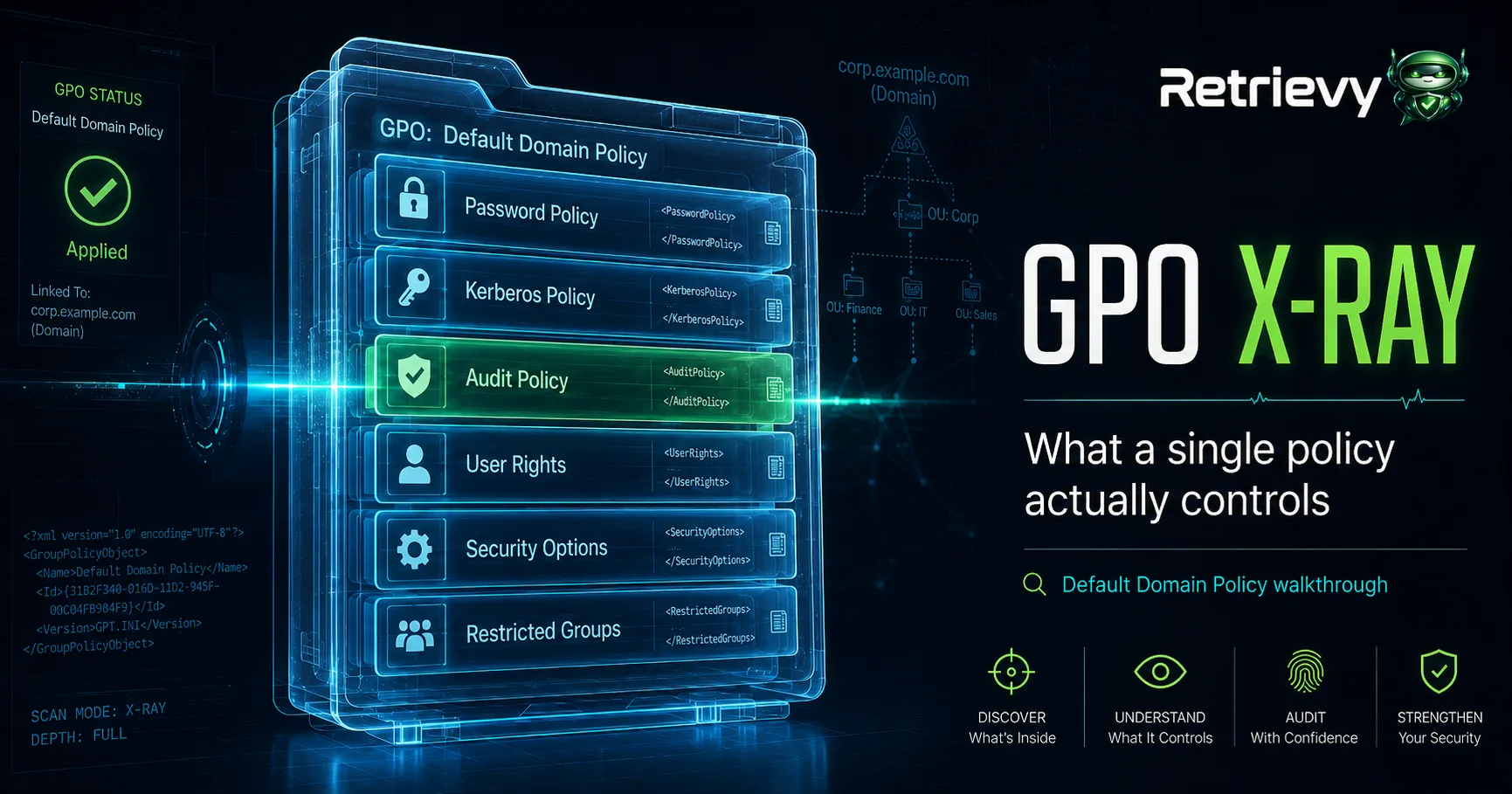
Ask most tools whether a GPO is "applied" and you get a green check. Ask what that GPO actually does to the domain and you get silence. That gap is the whole problem with how group policy gets audited today.
We built GPO X-Ray around a simple observation: a single GPO is not one setting, it's a container for a dozen unrelated policy areas that happen to ship in the same XML blob. Linked, enabled, applied to the right OU: none of that tells you whether the contents are sane. Below is a walkthrough of the Default Domain Policy, the GPO every domain has and almost nobody actually reads end to end.
Password policy: the part everyone checks, half of it wrong
The Default Domain Policy is the only GPO in a domain where the account password policy (Computer Configuration > Windows Settings > Security Settings > Account Policies > Password Policy) actually takes effect domain-wide, because Windows only honors password policy from GPOs linked at the domain root for domain accounts. This is the single most common GPO misunderstanding we see: admins create a stricter password policy, link it to an OU full of workstations, and assume it overrides the domain default. It doesn't, not for domain account passwords. Fine-grained password policies (PSOs) are the only supported way to get per-group password rules, and they live in AD DS, not in a linked GPO at all.
So "password policy: applied" as a status tells you the GPO evaluated. It tells you nothing about whether minimum length is still 7 characters (a common legacy default), whether reversible encryption got flipped on by a forgotten troubleshooting step, or whether lockout threshold is set to 0 (never lock out), which we still find in production domains often enough that it's not a corner case.
Kerberos policy: the setting nobody touches until it's an incident
Same container, different tab: Account Policies > Kerberos Policy. Max ticket lifetime, max renewal, clock skew tolerance. These rarely get misconfigured maliciously, but they get misconfigured operationally, usually a max lifetime extended to work around some legacy Kerberos client, then never reverted. An audit that only asks "is the Default Domain Policy applied" will never surface that the ticket lifetime is 30 days instead of Microsoft's 10-hour default, which matters a great deal if you're reasoning about how long a stolen TGT stays useful.
Audit policy: the setting that decides whether you have logs at all
Security Settings > Advanced Audit Policy Configuration (or the legacy nine basic categories) determines whether Windows event logs contain the events your SIEM depends on. Kerberos authentication events, credential validation, security group changes: all gated behind audit subcategories that can be enabled in the GUI and silently overridden by the legacy audit policy if SCENoApplyLegacyAuditPolicy isn't set. This is a classic case where two settings interact and the net effect isn't visible from either one in isolation. A flattened "policy applied" status can't represent an interaction between two settings in two different areas of the same GPO.
User rights assignments: where privilege actually gets granted
Security Settings > Local Policies > User Rights Assignment is where SeDebugPrivilege, SeBackupPrivilege, SeTakeOwnershipPrivilege, and SeEnableDelegationPrivilege get handed out. This section rarely gets touched in the Default Domain Policy itself (it's more commonly modified in OU-linked GPOs for specific tiers), but when it is touched at the domain root, it applies everywhere. Over-grants here are a direct privilege escalation path, and they're exactly the kind of setting that survives silently for years because nobody re-reads the GPO after the original change ticket closed.
Security options: hundreds of registry-backed toggles in one bucket
Security Options covers LDAP signing requirements, SMB signing, LAN Manager authentication level, NTLM restriction settings: dozens of individually consequential toggles bundled into one node in the GPMC tree. LDAP signing and channel binding in particular are worth checking explicitly given how often they get left at "negotiate" instead of "require" years after the relevant guidance changed. Each of these is ADMX-backed (or legacy ADM/registry.pol-backed for the older security template settings), and each deserves its own pass/fail, not a bucket-level rollup.
Restricted Groups: quietly rewriting local group membership
If Restricted Groups is configured anywhere in the policy chain that reaches a machine, it enforces (not just seeds) local group membership on every apply cycle. That's powerful and dangerous in the same breath: it's the correct way to guarantee your Tier-0 admin group is the only thing in local Administrators, and it's also how misconfigurations get replicated to every machine in scope, repeatedly, every 90 minutes, overwriting whatever a local admin tried to fix by hand.
Why decomposition is the point
Each of these six areas has its own risk model, its own compliance mapping, and its own blast radius. Rolling them into "GPO applied: yes" is like rolling up a firewall's entire rulebase into "firewall running: yes." GPO X-Ray reports each layer as a distinct finding, tied back to the specific ADMX-backed setting and the GPO and OU it resolves from after inheritance and precedence, because in a domain with more than a handful of GPOs, the setting that's actually in effect on a given machine is rarely the one you'd guess from looking at any single linked policy in isolation.
Group policy walkthroughs like this one are the same exercise we run programmatically: pull every GPO, decompose it by settings area, resolve precedence per OU, and flag the areas where the resulting effective policy doesn't match either the security baseline or, just as often, doesn't match what the admin who wrote the GPO ten years ago actually intended.
Keep reading in Articles