Audit the policy setting that wins, not just the GPO that exists.
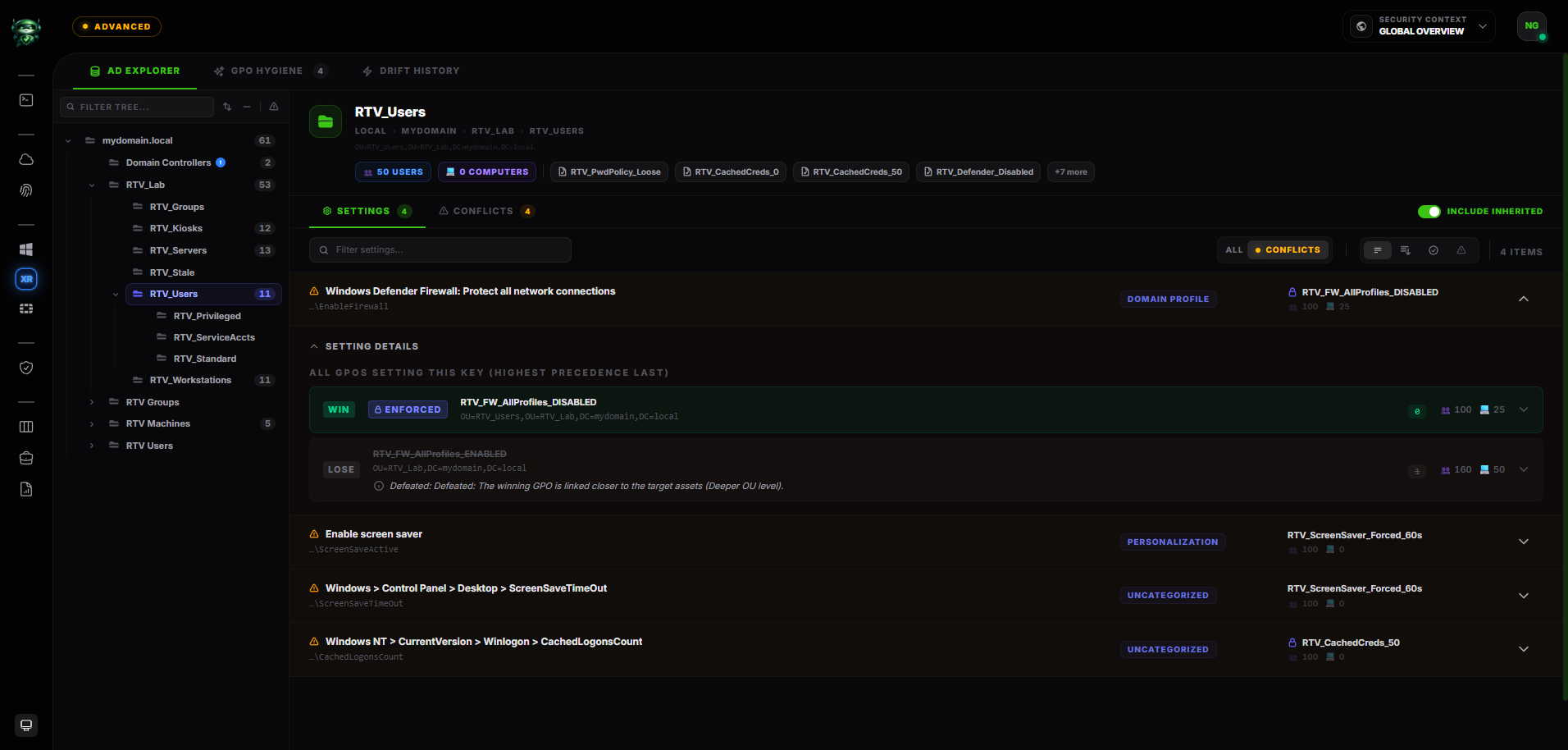
Retrievy GPO X-Ray inventories Group Policy Objects, follows collected domain and OU links, applies link order, enforced-link, and block-inheritance rules, and shows the registry or security-policy setting that wins in that collected hierarchy. It adds scope estimates, hygiene evidence, drift, and remediation without presenting the result as endpoint Resultant Set of Policy.
Knowing that a GPO is linked does not tell you which value governs.
A conventional GPO list answers what exists and where it is linked. A security audit needs the next layer: link order, deeper OU links, enforced parents, blocked inheritance, disabled partitions, conflicting settings, and the population beneath each linked OU.
That still is not full endpoint RSoP. Local and Site policy processing, live WMI evaluation, custom security-filter token resolution, loopback, and endpoint-local state can change the final outcome. Retrievy stays explicit about the boundary of the collected domain and OU evidence.
Within that boundary, GPO X-Ray turns raw policy files and hierarchy data into a reviewable explanation of the winner, the silenced values, the likely scope, and what changed between snapshots.
Explain precedence, scope, and change from one collected model.
The value is the relationship between the objects, links, settings, and affected hierarchy, not another inventory export.
Inventory and link map
Inventory GPO identity and status, domain-root and OU links, link order, enabled state, enforced links, block inheritance, and user or computer partition state.
Collected setting resolution
Decode supported Registry.pol and security-policy entries, walk the collected domain-to-OU chain, and explain the winning value and the values it supersedes.
Scope and hygiene
Estimate the maximum users and computers beneath a linked OU, then highlight empty, orphaned, and shadowed-within-the-model GPO conditions with supporting context.
Drift and remediation
Compare consecutive snapshots for GPO, link, status, and collected effective-setting changes, then keep evidence and remediation work attached to the finding.
The parts of Group Policy that determine the collected result.
GPO X-Ray distinguishes computed evidence from scope indicators that still require endpoint validation.
GPO inventory and status
Known policy objects, machine and user partition status, linked and unlinked state, and whether policy files contain supported settings.
Links and link order
Domain and OU attachment points, enabled state, ordering at each scope, and the hierarchy a setting traverses.
Enforcement and inheritance
Enforced links and block-inheritance boundaries that change which upstream policy settings remain in the collected chain.
Security and WMI filter indicators
Whether custom security filtering or a WMI filter is attached, plus collected filter metadata. Retrievy does not claim live per-endpoint predicate or token evaluation.
Registry and security settings
Supported machine and user Registry.pol entries plus supported security-policy settings that are not stored in Registry.pol.
ADMX enrichment
Friendly policy names and descriptions when an imported ADMX definition matches; raw registry evidence remains visible when it does not.
Targeted permission risk
Supported dangerous GPO delegation findings, not a complete effective ACL matrix for every principal.
Change evidence
Added, removed, relinked, reordered, reconfigured, or newly winning settings across consecutive collected snapshots.
Follow a policy from collection to verified correction.
-
1
Detect
Build the collected hierarchy
The Windows collector gathers the domain and OU tree, GPO metadata, links, supported policy files, and filtering indicators needed for server-side analysis.
-
2
Prioritize
Show the winner and likely reach
GPO X-Ray explains why a setting wins, shows conflicting values, and estimates the maximum users and computers beneath the relevant linked OU.
-
3
Remediate
Change the right policy layer
Evidence identifies the setting, GPO, link location, and defeat reason so the operator can remove an obsolete exception or correct the intended policy.
-
4
Verify
Compare the next snapshot
The next collection recalculates the hierarchy and records whether links, settings, and winners changed as intended or drifted again.
A child OU silently weakens an SMB baseline
In this fictional lab, the domain-linked Workstation Baseline requires SMB signing. A Legacy Devices GPO linked to a child OU sets the same registry value to disabled for 42 computers.
- Setting
- Microsoft network client: Digitally sign communications (always)
- Upstream value
- Workstation Baseline → Enabled
- Winning value
- Legacy Devices → Disabled
- Scope estimate
- Maximum 42 computers beneath the linked OU
Analysis
A simple inventory reports both GPOs as present. The collected precedence view explains that the deeper OU link wins for the subtree and preserves the registry evidence behind both values.
Remediation
The AD owner validates the legacy dependency, narrows or removes the exception, and records the correction against the GPO evidence. Endpoint validation remains appropriate where WMI or custom security filtering can alter application.
Verification
The next snapshot recalculates the winner. Retrievy can show that the weakening value no longer wins in the collected hierarchy and retain the change in drift history.
A defensible explanation, with clear boundaries.
Winner with proof
See the winning and silenced settings, their GPOs, OU levels, enforcement state, and defeat reasons rather than a flat applied/not-applied label.
Scope without false precision
User and computer counts are presented as a maximum OU-scope impact estimate, not an exact endpoint blast radius when filters may narrow application.
Raw and friendly evidence
ADMX enrichment makes known registry settings readable while preserving raw paths and values when no definition matches.
Change as a first-class signal
Snapshot comparison makes relinking, setting changes, and a new effective winner reviewable instead of waiting for the next annual audit.
Use cases beyond inventory.
- Which collected setting wins at this OU, and why?
- Which upstream values are silenced by a deeper or enforced link?
- Where does block inheritance alter the policy chain?
- Which GPOs are empty, orphaned, or appear fully superseded in the collected hierarchy?
- Which supported registry settings have a matching ADMX explanation?
- What changed between the two most recent policy snapshots?
Continue with the relevant solution and technical guidance.
Related Retrievy solutions
Related security guidance
GPO Audit Tool, answered.
1. Is GPO X-Ray a full Resultant Set of Policy engine?
2. Does Retrievy evaluate security filtering and WMI filters?
3. Is the blast radius an exact affected-device count?
4. Can Retrievy read every Group Policy setting?
5. How does GPO change monitoring work?
Trace the setting before you change the wrong GPO.
Use GPO X-Ray to review collected precedence, scope, evidence, and drift in your own Active Directory hierarchy.