Introducing Identity X-Ray: See What Your Permissions Actually Grant
Your list of admins is not your attack surface. Here is how to map the real identity attack paths, on-prem and in the cloud, and find the shadow admins who can reach Tier 0 through a chain nobody documented.
Ask most teams who their domain admins are and you will get a clean list in about ten seconds. Ask who can become a domain admin, and the room goes quiet. Those are two very different questions, and attackers only care about the second one.
A list of privileged users tells you who holds the keys today. It says nothing about the helpdesk account nested three groups deep into Domain Admins, the service principal one app permission away from Global Administrator, or the backup server that quietly became Tier 0 the day someone installed directory sync on it. Those are identity attack paths, and they are where real intrusions live.
This is a practical guide to finding them. We will define what an identity attack path actually is, explain what a shadow admin is and why your access reviews miss them, and walk through the same question on-prem and in the cloud: who can reach the crown jewels, and by which chain.
What is an identity attack path?
An identity attack path is a chain of relationships that lets one identity end up with the privileges of another. Each link is legitimate on its own. Membership in a group. Ownership of an application. A role that can reset passwords. An access-control entry on a sensitive object. Strung together, they form a route from an ordinary account to full control.
The reason this matters is that privilege is transitive and your admin list is not. If user A owns group B, and group B is nested inside group C, and group C holds Domain Admins, then user A is a Domain Admin in every way that counts. No access review that lists the direct members of Domain Admins will ever show them.
Mapping this properly means building a graph of who confers privilege on whom, then walking every route that terminates at a crown jewel. A crown jewel is anything that, once controlled, ends the game: Domain Admins, Enterprise Admins, the krbtgt account, AdminSDHolder, a Global Administrator role in Entra ID, or Owner at the root of your Azure tenant. The graph does not care which team owns the intermediate hops. It only cares whether a path exists.
What is a shadow admin?
A shadow admin is an account that is not nominally privileged, yet still reaches your crown jewels through a chain. The term matters because it names the exact blind spot every list-based review has. If your process is "export the members of the privileged groups and confirm they belong," you will confirm a clean list and miss every shadow admin behind it.
Shadow admins show up in a few recurring shapes:
- Nested group membership. A user is in a group, that group is in another group, and somewhere up the chain sits a privileged role. The deeper the nesting, the less likely anyone remembers it.
- Object ownership. Whoever owns a group can add themselves to it. Whoever owns an application registration can mint a credential for its service principal. Ownership is a quiet path to the privileges of the thing you own.
- Delegated rights. An access-control entry that grants write access, reset-password rights, or the ability to replicate directory changes turns an ordinary account into a stepping stone.
- Non-human identities. A service principal or managed identity with a strong app permission is frequently the shortest path of all, and it never appears in a human-focused review.
The honest way to surface these is to compute reach across the whole graph and then label each identity by how it got there. An account that holds a role directly is by-design privileged. An account that only reaches a role through a chain is a shadow admin. Both are real. Only one is on your list.
Chokepoints: why one fix closes many paths
Once you can see every path, the natural next question is where to start. The answer is almost never "work through the findings one at a time." It is "find the chokepoint."
A chokepoint is a node that many paths funnel through. A single over-permissioned nesting group, a widely owned service principal, an ACL on a template that a dozen accounts inherit. Because paths share these nodes, breaking one chokepoint collapses every path behind it at once. Ranking chokepoints by how many accounts pass through them turns a wall of hundreds of findings into a short, ordered list of high-leverage fixes.
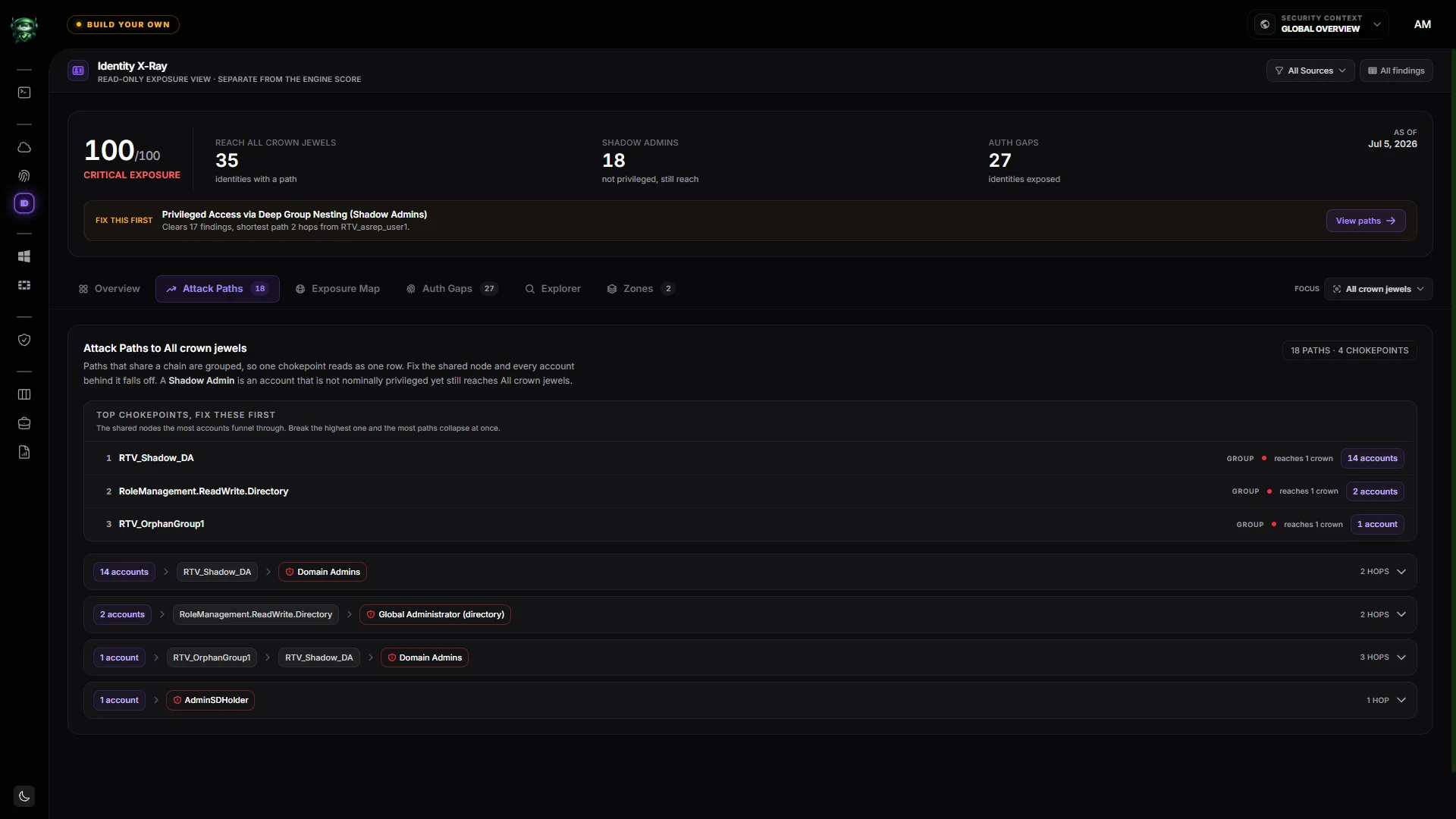
This is the difference between remediation that feels endless and remediation that moves the number. Fix the top chokepoint, watch a third of the paths disappear, and move to the next one. The math rewards fixing the node that matters rather than triaging symptoms.
The cloud has attack paths too: CIEM
On-prem teams have asked "who can become Domain Admin?" for years. The cloud rarely gets the same answer, because the pieces live in different places. Entra ID roles are in one blade. Azure role assignments are in another. Application permissions, group ownership, and managed identities are each their own world. No single screen shows the escalation.
Cloud Infrastructure Entitlement Management, or CIEM, is the discipline of reading all of those entitlements and answering the escalation question for the cloud the way directory tooling answers it on-prem. The escalation edges that matter in Microsoft Entra ID and Azure are well understood:
| Edge | How the escalation works |
|---|---|
| Group chain to a crown role | A user or service principal is a member, nested arbitrarily deep, of a group that holds Global Administrator or another crown role. |
| PIM-eligible assignment | A dormant but eligible role assignment is still reach. It is one self-service activation away from active admin. |
| Graph app permission | A service principal holding RoleManagement.ReadWrite.Directory or AppRoleAssignment.ReadWrite.All is one non-interactive hop from Global Administrator. |
| Cross-app takeover | Application.ReadWrite.All lets a principal mint a credential on any other application and authenticate as it, inheriting its reach. |
| Azure RBAC self-escalation | Owner, User Access Administrator, or Role Based Access Control Administrator at a scope can grant Owner to itself. |
| Ownership add-credential | An owner of a service principal, its app registration, or a role-bearing group adds a credential or itself and inherits the privilege. |
| Managed-identity token theft | Code-execution rights on a resource that hosts a managed identity let a principal read the identity token from instance metadata and act as it. |
Notice how many of these involve applications rather than people. Roles like Application Administrator and Cloud Application Administrator are frequently one deliberate step from Global Administrator, which is why non-human identities deserve the same scrutiny as your named admins, not less.
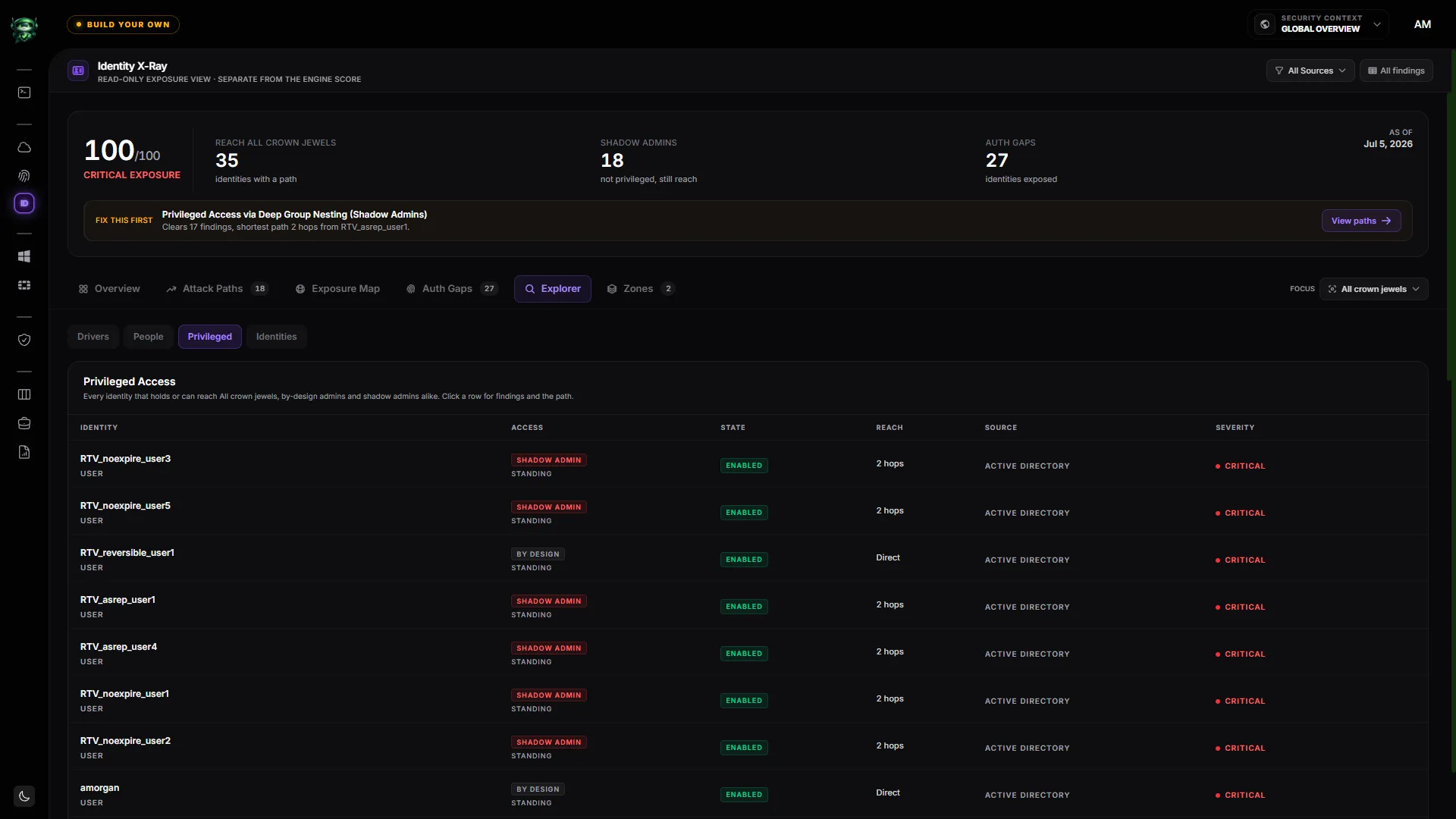
The point of pulling these into one inventory is to see standing access next to just-in-time eligibility, by-design admins next to shadow admins, and cloud reach next to on-prem reach, all measured the same way. A PIM-eligible path is not the same as a live one, so it should be drawn distinctly and ranked below standing access, but it is still a path and it still belongs on the map.
The servers that are secretly Tier 0
Some of the most dangerous attack paths do not run through an account at all. They run through a machine that quietly holds the keys.
Directory synchronization is the classic example. The account behind Azure AD Connect, and the server it runs on, is effectively Tier 0. It can write to your directory and its credentials sit on an off-domain box that is usually less hardened than a domain controller. Compromise that server and you have a path into the identity plane that no group membership will reveal. The same logic applies to Active Directory Certificate Services templates that let a low-privileged user enroll a certificate impersonating an admin, and to any host that runs a service under a privileged identity.
Treating identity as a graph is what makes these visible. The server is not a user, but it hosts one, and the path from "I can run code here" to "I am now that identity" is exactly the kind of edge a list will never contain.
Authentication gaps widen every path
Every attack path assumes the attacker can actually use the identity at the end of it. That assumption gets a lot safer for the defender when strong authentication is in the way, and a lot more dangerous when it is not.
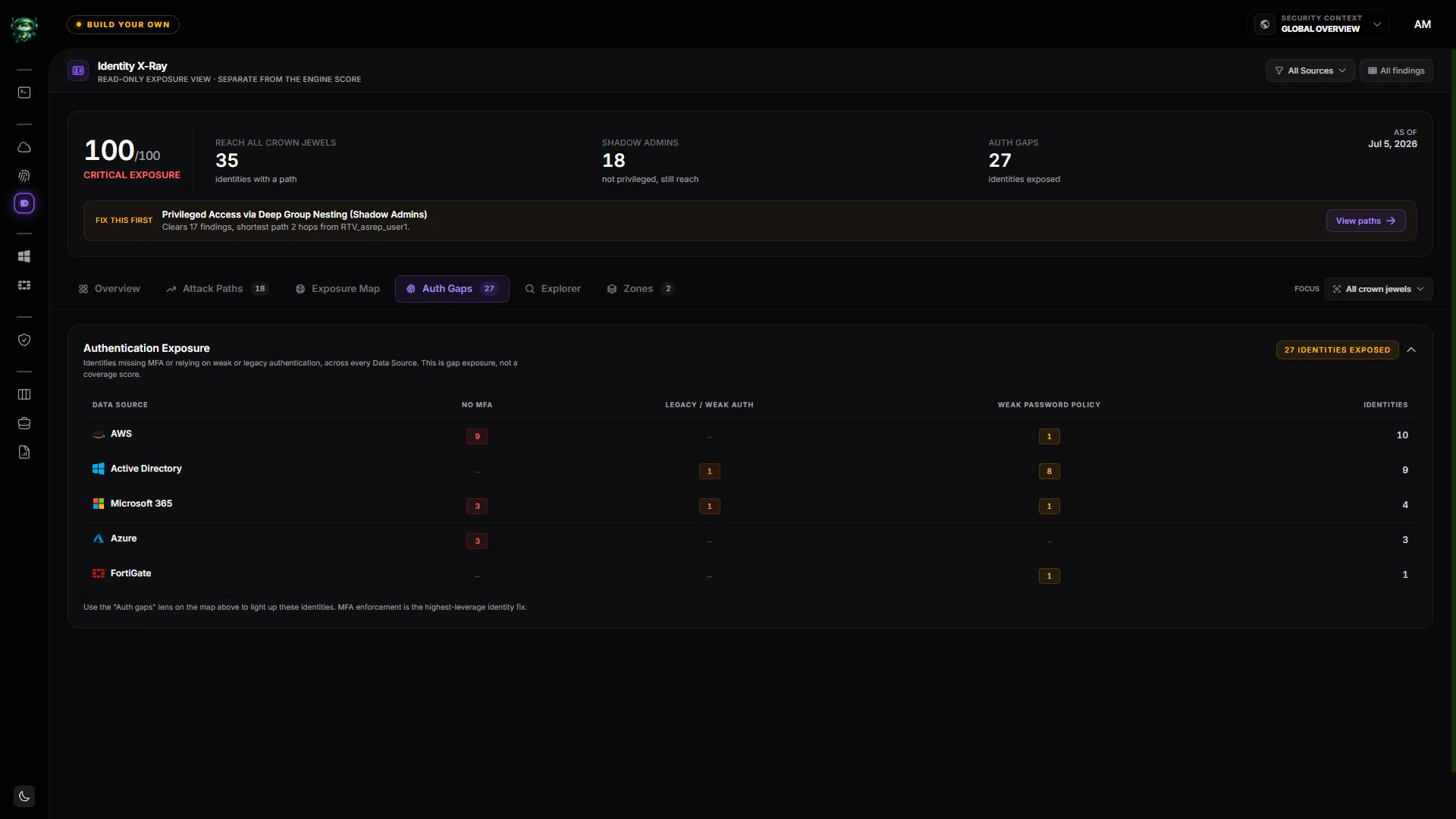
An account with a proven path to Tier 0 that also lacks multi-factor authentication, or still permits legacy authentication protocols, or is covered by a weak password policy, is not a theoretical risk. It is the specific account an attacker will target first, because the path is already mapped and the front door is unlocked. Counting these gaps as exposure, per Data Source, rather than reporting a coverage percentage, keeps the real number in view instead of averaging it away.
Kerberoasting belongs in the same conversation. A service account with a registered service principal name and a weak, RC4-encrypted password is a path that an attacker can walk offline, without touching a domain controller after the initial ticket request. Cleaning up weak Kerberos cryptography and moving service accounts to managed service accounts closes a path that has worked for a decade and still works today.
Define your own crown jewels
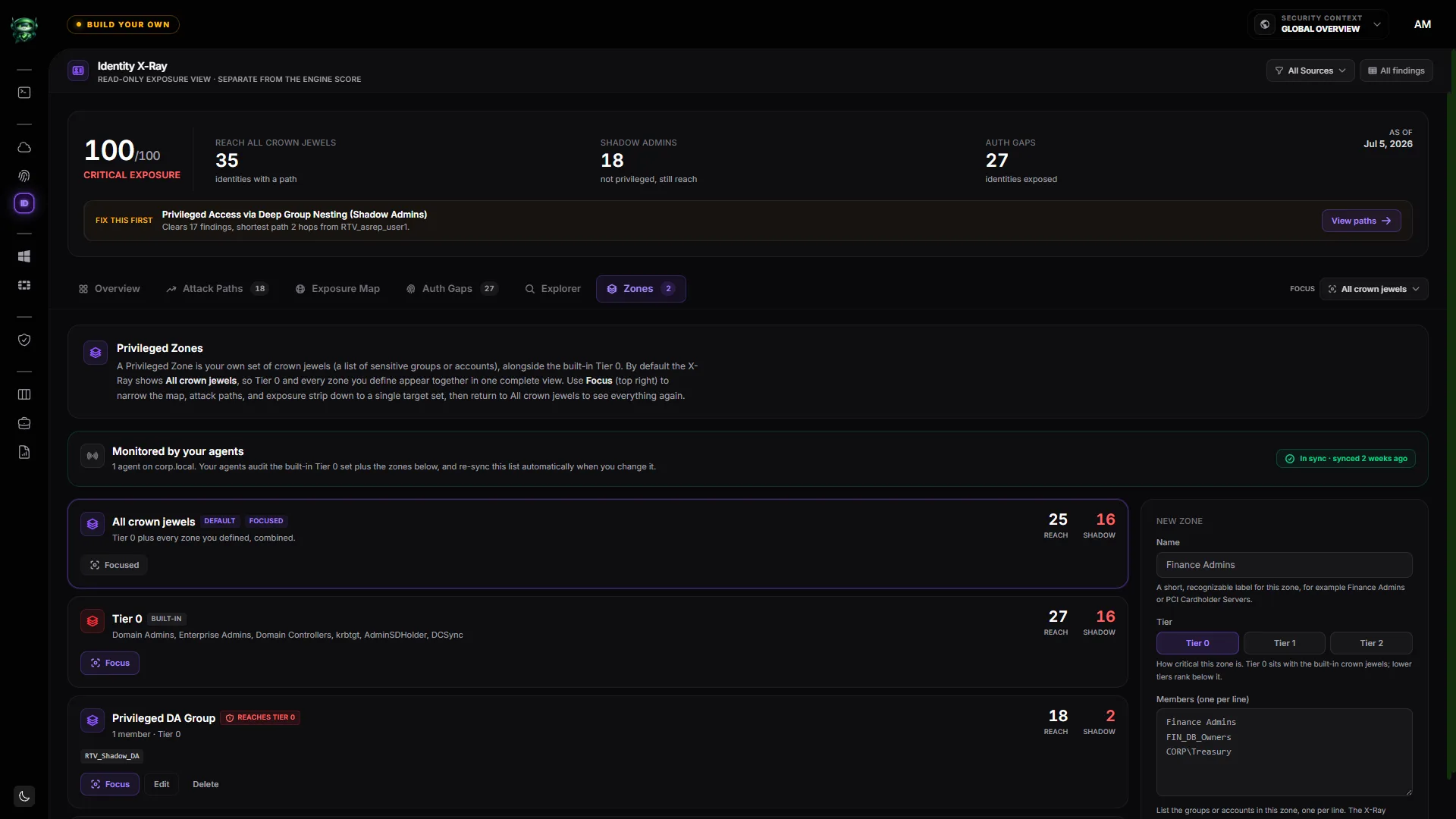
Built-in Tier 0 is a good default, but it is not the whole story for most organizations. Your Finance Admins group, your PCI cardholder servers, your source-code signing identity: these are crown jewels too, and the question "who can reach them?" is exactly as important as it is for Domain Admins.
The right model is to let you define custom privileged zones alongside the built-in Tier 0, then recompute reach and shadow-admin counts for whatever target you name. Ask "who can reach the Finance Admins group?" and get the same graph, the same chokepoints, and the same shadow-admin list, scoped to what you actually care about.
How to operate this continuously
Attack-path analysis is not a one-time audit. Group memberships change, applications get new permissions, and a fresh service principal can open a path overnight. The teams that stay ahead treat it as a continuous read-out rather than an annual project.
A workable cadence looks like this:
- Collect read-only, across every Data Source. Active Directory, Entra ID and Azure, your other clouds, and your network admin planes. Collection should never require write access anywhere.
- Watch three numbers. How many identities have a path to Tier 0, how many of those are shadow admins, and how many carry an authentication gap. Those three tell you the shape of your exposure at a glance.
- Fix chokepoints first. Start with the shared node that the most accounts funnel through, not the longest finding list.
- Re-measure after every change. Confirm the paths you meant to close actually closed, and that no new one opened behind them.
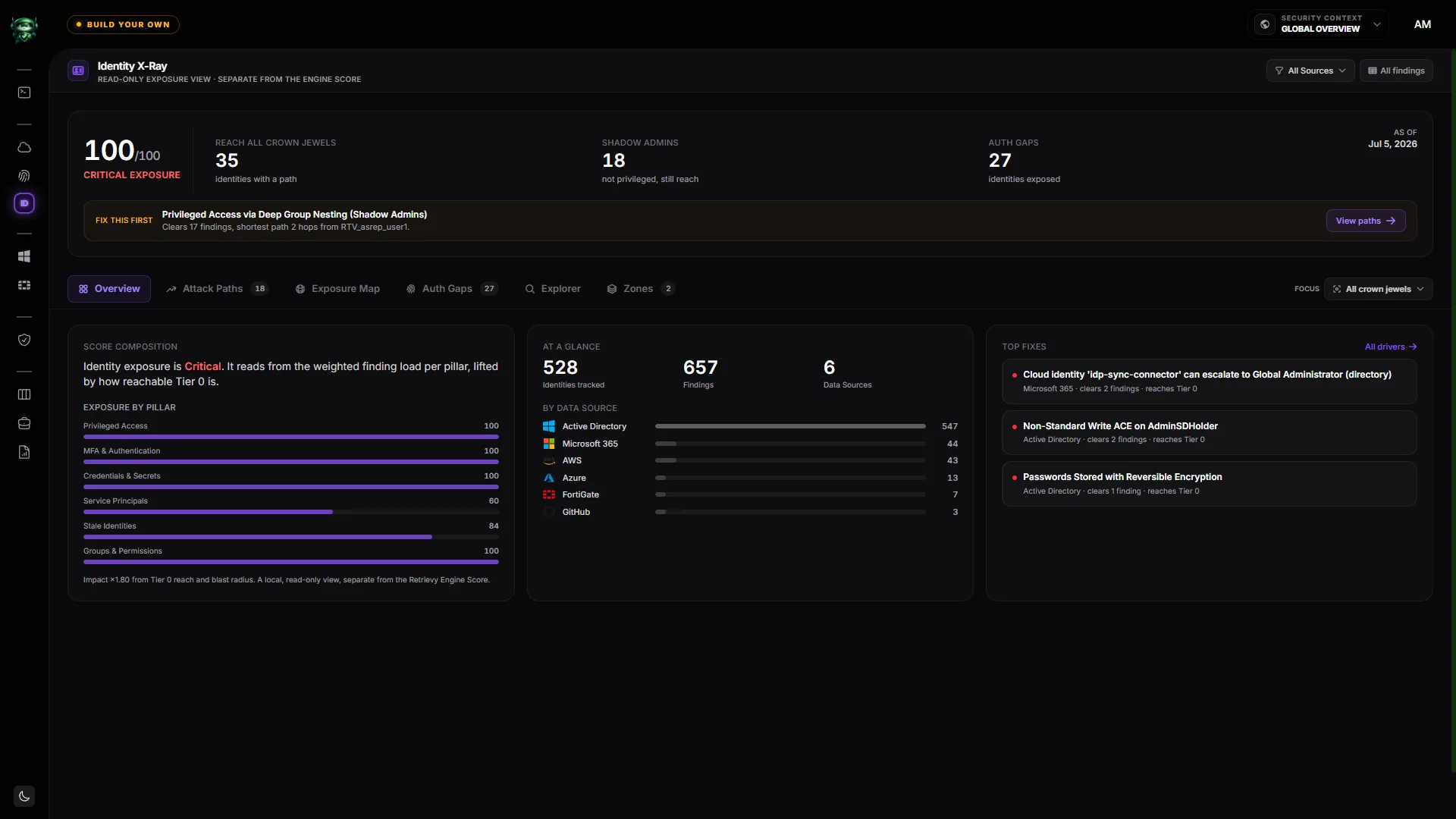
The goal is not a prettier report. It is to make the second question, the one that goes quiet in the room, as easy to answer as the first. Who can reach Tier 0, right now, on-prem and in the cloud, and what single fix closes the most paths.
Retrievy answers that question in one place. Identity X-Ray builds the graph across Active Directory, Entra ID, Azure, and your other Data Sources, maps every attack path to Tier 0, names the shadow admins, and ranks the chokepoints, as a read-only view that never changes the score your auditors see. If you want to see the paths into your own environment, explore Identity Security Posture Management on Retrievy.
Keep reading in Releases