What Is Active Directory Tiering and Why Does My Business Need It?
Most Active Directory environments have a tiering diagram in a compliance binder and no enforcement in production. Here's why the gap persists, and why verification after project close matters more than the initial design.
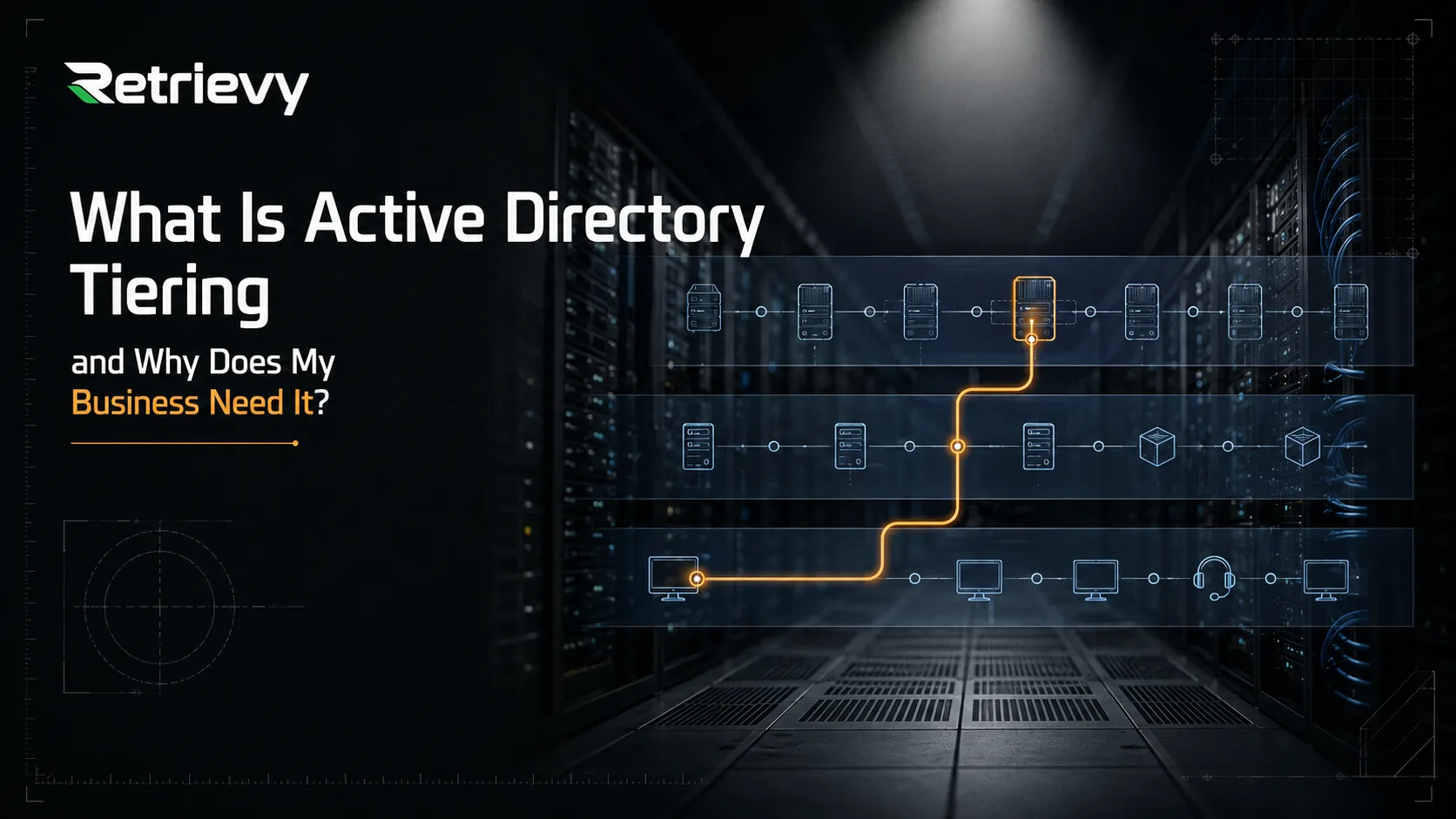
Every Active Directory hardening guide you will find contains the same diagram. Three colored bands stacked on top of each other. Tier 0 in green at the top, holding your Domain Controllers. Tier 1 in blue in the middle, holding your application and file servers. Tier 2 in yellow at the bottom, holding workstations and the helpdesk. Green arrows moving sideways within each band. Red arrows with stop signs crossing between them.
I have been doing enterprise cybersecurity consulting for years, and I have lost count of how many environments I have assessed. In practically all of them, that diagram exists somewhere. In a slide deck, in a compliance binder, in an architecture document someone wrote in 2019.
In practically none of them is it actually applied.
That gap is the subject of this article. Not the theory of tiering, which you can read on Microsoft Learn in fifteen minutes, but why it fails in real companies, what it actually protects you from, and the specific reason I now believe most tiering projects are doomed before they start: not because the design was wrong, but because nobody ever verified it again after the project closed.
What Active Directory Tiering Actually Is
Active Directory tiering is a control model that separates administrative privilege into levels based on what an account can ultimately control, and then prevents credentials from those levels from ever landing on machines at a lower level.
The standard Microsoft model uses three tiers.
Tier 0 contains the assets that control the identity of your entire environment. Domain Controllers, Domain Admins, Enterprise Admins, the krbtgt account, AdminSDHolder, and anything that can perform a DCSync operation. If an attacker owns any Tier 0 asset, they own the forest.
Tier 1 contains your servers and the applications running on them. File servers, database servers, line-of-business applications. Compromise here is expensive, but it is contained to those systems.
Tier 2 contains workstations, laptops, and the helpdesk staff who support them. This is where your users live, and it is where almost every attack begins.
The rule connecting the tiers is deceptively simple. An administrative account from a higher tier must never authenticate interactively to a machine in a lower tier. A Domain Admin never logs into a workstation. A server administrator never logs into a laptop to fix a printer.
The reason for that rule is the entire foundation of the model, and it is worth being precise about, because I hear it explained imprecisely constantly.
Why the Rule Exists: Credentials Stay Behind
When you log into a Windows machine, you leave something behind in memory.
Specifically, an interactive logon, meaning a console session or an RDP session where you type your password, leaves reusable authentication material in the LSASS process. On any modern, patched Windows system with WDigest disabled, your plaintext password is no longer sitting there. But the NTLM hash is, and more importantly the Kerberos Ticket Granting Ticket is. Either of those is enough for an attacker with local administrator rights on that machine to authenticate as you elsewhere. Pass-the-hash and pass-the-ticket are not exotic techniques. They are Tuesday.
This is the precise reason the rule is about interactive logons and not about all use of privileged accounts. A network logon, the kind that happens when you run a remote PowerShell command, map a drive, or use WinRM, does not normally leave reusable credential material on the target. That distinction matters practically, because it means a Domain Admin can administer a system remotely in ways that are far safer than RDP. If you do need RDP into a lower-tier system, Restricted Admin mode and Remote Credential Guard exist specifically to prevent your credentials from being exposed on the target host.
So the accurate way to state the risk is this: never perform an interactive logon with a privileged account on a machine you do not fully trust. Because the moment you do, your credential is only as safe as that machine is.
And here is the part that determines everything else: a workstation is never fully trusted. It browses the web. It opens email attachments. It runs whatever the user installed. It is, by design, the most exposed device you own.
The Direction Nobody Talks About
Most explanations of tiering stop there, focused on admins descending into lower tiers. That is only half of the exposure, and in my experience it is not even the half that breaks most environments.
The other half is the control path running upward.
Ask yourself who can administer the machine your Domain Admin logs into. If a Tier 2 helpdesk group has local administrator rights on that workstation, or the ability to push software to it, or ownership of the OU it sits in, then compromising a helpdesk account gives an attacker control of a Tier 0 credential without a single admin ever logging in where they should not have.
The same applies to management agents. Your endpoint protection console, your RMM tool, your patch management platform, your backup agent. If any of those runs with domain administrative rights across your entire estate, then the server hosting that console controls your domain, regardless of what your OU structure looks like. It is a Tier 0 asset wearing a Tier 1 costume.
Tiering is not a diagram of where accounts live. It is a statement about who can control whom, in both directions.
Why Tiering Fails in Real Companies
I want to be honest about the reasons, because the reasons you read in vendor whitepapers are not the reasons I actually encounter.
I rarely find a company that evaluated tiering and rejected it on cost. I rarely find one that tried and hit an insurmountable technical wall. What I find, over and over, is far more mundane.
Nobody knows about it. The team is competent at what they do, but tiering is a specialist topic. The people running Active Directory in most mid-sized companies came up through infrastructure, not security. They keep the domain running, they handle the tickets, they do the migrations. Nobody ever taught them that the account they use daily is the single most valuable object in the environment.
Nobody owns it. Even when the team knows, tiering is not anyone's job. It is not on a roadmap, no one is measured on it, and it competes with the ticket queue for attention. The projects that succeed have a named person who owns identity security. Most companies under a thousand employees do not have that person.
Those two reasons account for most of what I see. They are not sophisticated failures. They are organizational ones, and it is worth saying plainly because it changes what the fix looks like. If tiering fails for lack of knowledge and lack of ownership, then the answer is not a better architecture document. It is making the current state visible enough that it becomes impossible to ignore.
How the Boundary Actually Breaks
Let me describe the pattern I have watched play out, because it is far more ordinary than most people expect and it maps directly onto the tier model.
It starts in Tier 2, which is where it almost always starts. A standard user account, no special privileges, nothing interesting about it. The credentials leak, whether reused from a breached third-party service, harvested by a phishing page, or taken by an infostealer on a personal device. An attacker now authenticates as an ordinary employee.
At this point the attacker has exactly what that employee has. Their mailbox, their file shares, their applications. Inconvenient, but contained. This is the tier model working as intended: a Tier 2 identity doing Tier 2 things.
The next move is local privilege escalation on the workstation. An unpatched vulnerability, a vulnerable driver, a misconfigured service, a scheduled task running with elevated rights, a password sitting in a script. The specific technique varies and barely matters. What matters is that the attacker goes from being a user on that machine to being an administrator on that machine.
Still, on paper, this is one compromised endpoint. Reimage it and move on.
Then comes the step that turns an incident into a catastrophe, and it is a configuration decision made years earlier by someone who was not thinking about attackers at all: the local administrator password on that workstation is the same as the local administrator password on every other machine in the environment.
No LAPS deployment. No PAM solution rotating credentials. Somebody set that password during the original image build and it propagated to every device deployed from it since. It has probably not changed in five years, and several people who no longer work there know what it is.
The attacker extracts that credential from the one machine they own, and now they have local administrator on all of them.
That is the tier boundary collapsing. Not through a clever attack on Active Directory, not through a Kerberos exploit, not through anything that would appear in a threat intelligence report. Through a shared password.
What follows is patient, unremarkable work. Move to other workstations and check what credentials are cached in memory. Find the machine where a server administrator logged in interactively to troubleshoot something, because in an environment without tier separation somebody always has. Take that credential, and you are in Tier 1. Repeat on the servers, looking for the session where a domain administrator logged in to install something, the service account running with far more privilege than its service needs, or the management agent that authenticates to every host with one powerful identity. Where nobody has enforced logon restrictions, one of those is always there.
That is Tier 0.
The whole sequence is a chain of individually defensible decisions. One image for all workstations is efficient. Letting the server team RDP into a desktop to fix an issue is helpful. Giving the backup agent broad rights makes it work reliably. Nobody made an obviously bad choice. Together, those choices mean one leaked password belonging to someone with no privileges at all ends with an attacker holding the domain.
When ransomware is the payload, the damage is proportional to how far the chain ran. Stopped at one workstation, you reimage a laptop. Reaching Tier 0, you are rebuilding the environment and hoping your backup infrastructure was not reachable with the same domain credentials the attacker now holds. Domain-joined backup platforms with no offline or immutable copy get encrypted along with everything else, which is common enough that it should be assumed rather than hoped against.
Every link in that chain is something tiering is designed to break.
The Question That Actually Defines Tier 0
This is where I disagree with how tiering is usually taught.
Every guide gives you the same Tier 0 list: Domain Controllers, Domain Admins, Enterprise Admins, krbtgt, AdminSDHolder. That list is correct and it is incomplete, and companies copy it verbatim without ever asking whether it describes their environment.
Tier 0 is not a list Microsoft gives you. It is the answer to a question about your specific infrastructure: what systems, if an attacker controlled them, would let the attacker control the domain?
Run through your own environment honestly and you will find candidates the standard list never mentions.
- Your backup platform, because it holds a copy of everything and frequently holds stored domain credentials to do its job.
- Your endpoint protection or EDR console, because it can execute code as SYSTEM on every machine you own.
- Your software deployment platform, whether that is SCCM, Intune, or an RMM tool, for exactly the same reason.
- Your hypervisor management, because whoever controls the virtualization layer controls the virtual Domain Controllers running on it.
- Your PKI and certificate authority, because certificate templates can be abused to mint credentials for any identity in the domain.
- Any service account with domain administrative rights, and the servers those accounts authenticate to.
Most of these will be sitting in what you currently call Tier 1. They are not Tier 1. They are Tier 0 assets that were classified by what they do rather than by what they control, and that misclassification is where the real risk hides.
The backup platform deserves particular attention, because it is the one that determines whether a bad day becomes a fatal one. A backup system holds the material to reconstruct your entire business. That makes it a crown jewel by any reasonable definition. Yet it is routinely domain joined for authentication convenience, granted broad rights so jobs do not fail, and kept in the same datacenter as the systems it protects. Every one of those decisions means the backup shares a fate with the environment. An attacker who reaches Tier 0 reaches the backups too, and the recovery plan evaporates at precisely the moment it was supposed to matter.
This is a large part of why I built Privileged Zones into Retrievy the way I did. The platform ships with the standard Tier 0 definition built in, because you need a starting point. But you can define your own crown jewels, whether that is your backup infrastructure, a finance server group, or a cardholder data environment, and the entire attack path analysis recomputes against your definition. Your crown jewels are yours to define. A tool that only knows Microsoft's list will confidently tell you that you are secure while your backup server sits wide open.
Why This Is Getting Harder, Not Easier
Two things have changed since the classic tiering model was written.
The first is that the boundary moved. Your identity plane is no longer just Active Directory. It is Active Directory plus Entra ID, plus whatever roles exist in AWS or Azure, plus your Microsoft 365 tenant, plus the admin accounts on your firewall. Escalation paths now cross between them. A compromised identity in the cloud can reach on-prem through directory synchronization. An on-prem compromise reaches the cloud through the same channel in reverse. Tiering on-prem while your Entra tenant has fourteen Global Administrators, four of them without MFA, is solving half a problem.
The second is that Microsoft retired the old prescriptive answer. The ESAE hardened forest architecture, the Red Forest, is no longer the general recommendation. Microsoft now points organizations toward modern privileged access strategy and cloud-based just-in-time controls. That is defensible guidance for a cloud-first company. For the very large number of businesses still running a conventional on-prem Active Directory, it left a real gap in practical direction, which is part of why so many teams have a diagram and no implementation.
Where to Start: A Practical Order
Here is the sequence I would use, ordered by return on effort rather than by architectural elegance. You do not need to complete all of it. Getting through the first four puts you ahead of most companies I assess.
Step 1: Define What Tier 0 Actually Means in Your Environment
Before touching a single GPO, answer the question from the previous section. Write down every system that would give an attacker control of your domain. Include the backup platform, the EDR console, the deployment tooling, the hypervisor, the PKI.
This step costs nothing but a meeting, and it is the one that changes how the rest of the project goes. It also tends to produce immediate action items on its own. If your backup platform made the list, that is the moment to ask why it is domain joined, whether there is an offline or immutable copy, and whether the only copy lives in the same building as everything it protects.
Step 2: Find Out Who Actually Reaches Tier 0 Today
Not who is in the Domain Admins group. Who can become a Domain Admin.
Those are different questions and the second one is much larger. Group nesting, delegated permissions on OUs, ACLs on privileged objects, ownership rights, service accounts with excessive privilege. A helpdesk account three groups deep inside a privileged group is functionally a Domain Admin, and it will not appear in any membership list anyone looks at.
Every environment I have assessed has more paths to Tier 0 than the team believed it had. Usually several times more. This is the step where a spreadsheet stops being enough, because the answer requires walking a graph rather than reading a list.
Step 3: Separate Administrative Accounts From Daily-Use Accounts
An administrator should have two identities. One for email, browsing, meetings, and normal work. One that exists solely to perform administrative tasks and is never used to read a message or open a document.
This is conceptually trivial and organizationally annoying, which is why it is skipped. It is also the single most important behavioral change in the entire model. A privileged account that is also a daily driver is exposed to every phishing email and every malicious attachment that reaches that person's inbox.
Step 4: Rotate Local Administrator Passwords Everywhere
Deploy Windows LAPS across your entire estate. Every workstation, every server, unique password per machine, rotated automatically.
I put this fourth only because the previous three shape the project. In terms of raw risk reduction per hour of work, it may be the highest-value item on this list. It is the control that breaks the chain described earlier, at the exact link where one compromised endpoint becomes control of the entire estate. Eliminating shared local administrator credentials is neither expensive nor politically difficult, and there is no good argument for leaving them in place.
Step 5: Enforce the Boundary With Group Policy
This is where you make the tier separation real, and you can do it without purchasing anything.
Use the user rights assignment settings in Group Policy to deny Tier 0 accounts the ability to log on to lower-tier systems. Specifically, apply Deny log on locally, Deny log on through Remote Desktop Services, Deny log on as a batch job, and Deny log on as a service to Domain Admins and Enterprise Admins on every OU that is not Tier 0.
Be aware of what this does and does not accomplish. It stops privileged credentials from being deposited on untrusted machines, which is a large share of the value. It does not stop the upward control path I described earlier, where a lower-tier group can administer a higher-tier machine. Closing that gap requires either Authentication Policy Silos, which enforce the restriction at the Kerberos level, or genuinely separate administrative workstations.
My honest advice: do the GPO work first. It is free, reversible, and delivers most of the benefit. Treat privileged access workstations as the next phase rather than a prerequisite, because "we need to buy hardware first" is where these projects go to die.
Step 6: Verify It Continuously
Everything above is a project. This step is why the project keeps mattering a year from now.
The Argument I Care About Most: Tiering Is a State, Not a Project
If you take one thing from this article, take this.
You can implement tiering perfectly on a Friday and have it broken by Tuesday.
Not through negligence. Through completely normal operational activity. Someone adds a service account to Domain Admins because the vendor's installer demanded it and the maintenance window was closing. Someone delegates permissions on an OU so the helpdesk can reset passwords without escalating tickets. Someone creates a GPO and links it one level higher than intended, and the resulting precedence quietly overrides a setting from your hardening baseline. Someone installs a management agent that requires elevated rights across the estate.
Every one of those actions is reasonable in the moment. Every one of them punches a hole in your tier model. And not one of them generates an alert in a typical environment.
This is why the static diagram is such a misleading way to think about tiering. The diagram implies a structure you build once. What you actually have is a state that decays, continuously, under normal operating pressure. The question is never "did we implement tiering?" The question is "is our tiering intact right now, and how would we know if it were not?"
Most companies cannot answer the second half of that question. That is the real gap, and it is bigger than the implementation gap.
Consider what continuous verification actually has to cover:
- Membership changes on privileged groups, including the indirect ones created through nesting
- ACL modifications on Tier 0 objects and on AdminSDHolder
- New delegations on organizational units that create escalation paths
- Group Policy changes that alter which settings actually win after precedence resolution
- Service accounts that acquire privilege they did not have last month
- LAPS coverage regressing as new machines are added outside the deployment scope
- Privileged accounts that go dormant and become forgotten attack surface
- Escalation paths that cross from your cloud identity plane into your on-prem one
That is not a quarterly review. Quarterly review means a hole can exist for eighty-nine days before anyone sees it. It also is not a penetration test, because a pentest tells you what was true during one week and then goes stale immediately. In the environments I have assessed, findings from a pentest report are routinely six months old by the time anyone acts on them, and the environment has drifted again in the meantime.
It has to be continuous, and it has to be automatic, because the one thing we know about the people who would otherwise do it manually is that they are busy with the ticket queue.
How Retrievy Approaches This
I built Retrievy because I kept finding the same failures across client environments and I was tired of finding them with scripts and spreadsheets. Everything below is what the platform does today.
The Identity X-Ray builds a directed graph of who confers privilege on whom, then draws every route that reaches your crown jewels. It walks group nesting, ACL and ACE rights, delegation, ownership, and cloud entitlements up to ten hops deep. This is the answer to Step 2 above, and it is the thing that is genuinely hard to do by hand. A helpdesk account nested three groups from Domain Admins appears exactly as clearly as a direct member.
It also ranks chokepoints, the shared nodes that the largest number of accounts pass through. That matters practically, because remediation capacity is finite. Fixing the top chokepoint can collapse dozens of paths at once, which is a very different experience from working through fifty individual findings.
Accounts that reach Tier 0 without being nominally privileged are labeled shadow admins, so accidental access is easy to distinguish from access somebody deliberately granted.
Privileged Zones let you define Tier 0 for your environment rather than accepting a generic list, which is the point I made about the backup server.
On the Active Directory side, the platform checks privileged account inventory, nested group escalation, dormant privileged accounts idle for over ninety days, Kerberoastable and AS-REP roastable accounts, and LAPS coverage gaps through schema attribute analysis. That last one identifies exactly which machines are still missing local administrator password rotation, which is precisely the pivot that turns one compromised endpoint into all of them.
The GPO X-Ray resolves Group Policy precedence the way Windows actually resolves it, following the full local, site, domain, OU order including enforced links and blocked inheritance. It shows the setting that actually wins, not just the list of policies that exist. It also shows per-GPO blast radius, the real count of users and computers a policy affects including everything pulled in by inheritance. If your tier boundary depends on a GPO, you want to know whether that GPO is actually winning.
The Drift Engine and AdminSDHolder Watch cover the continuous verification argument directly. Configuration changes are grouped and alerted with field-level detail, and membership churn or ACL anomalies on privileged groups trigger alerts. Routine patching produces no noise. A real change produces a real alert.
Because the same platform covers cloud posture and identity across AWS, Azure, Entra ID, GCP, and Microsoft 365 alongside Active Directory, escalation paths that cross planes appear on the same graph rather than falling into the gap between two separate tools.
The deployment is one signed MSI on a Domain Controller. It runs as SYSTEM using the host's Kerberos machine credentials, so there is no service account to create and no Domain Admin rights required. It is read-only by design. It never writes a GPO, never modifies a registry key, never touches the directory. The first audit appears the same day.
What to Do This Week
You do not need a budget approval or a project charter to make progress. Three things you can do in the next few days:
Write the Tier 0 list for your environment. One meeting, one document. Include the backup platform, the EDR console, the deployment tooling, the hypervisor, the certificate authority. Then look at where each of those sits today and how it authenticates.
Check whether your local administrator passwords are unique. If they are not, that is the highest-leverage fix available to you and it is achievable this quarter.
Find out how many accounts can actually reach Domain Admin. Not the membership list. The transitive answer, including nesting and delegation. If the number surprises you, and it usually does, you have found where to spend the rest of your year.
Then decide how you will know, six months from now, whether any of it is still true.
Because that is the part everyone skips. The diagram at the top of this article is not wrong. It has just been treated as a picture of a building when it is really a picture of a condition, and conditions require monitoring.
If you want to see what your current state looks like without spending a quarter building the assessment yourself, request a trial and point Retrievy at your environment. The agent installs in about five minutes and the first identity audit comes back the same day. Whatever the result is, you will at least be arguing about real findings instead of a diagram nobody ever verified.